Python 3.15 frozendict: when to use it, and where pandas still expects a dict
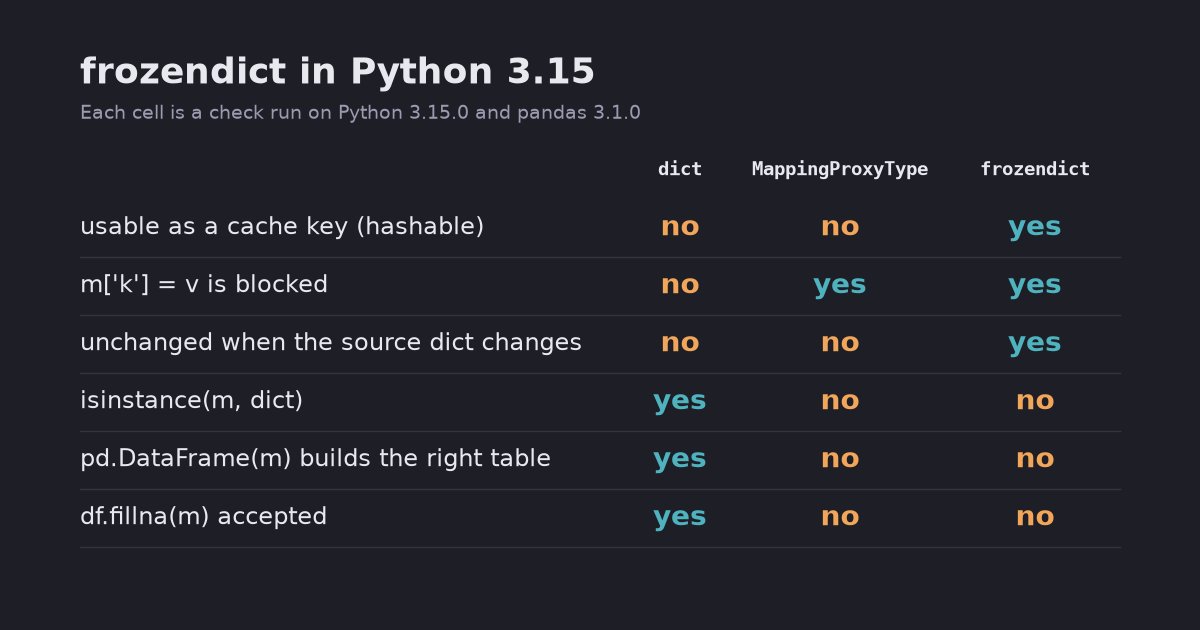
frozendict is an immutable, hashable dict that can be a cache key or a safe default argument. It is not a dict subclass, so pandas 3.1 rejects it in fillna and groupby.agg, and pd.DataFrame(frozendict) silently builds the wrong table. Tested on Python 3.15.0.
Python 3.15 adds frozendict, a built-in dictionary that cannot change after it is created (PEP 814). Because it cannot change, it can be hashed. You can put it in a set, use it as a dict key, or pass it to a function wrapped in functools.cache. A normal dict can do none of these.
Use it for small read-only mappings: a model config, a lookup table, a default argument. Convert it back with dict() before you pass it to libraries that check for dict. In pandas 3.1.0, pd.DataFrame(frozendict(...)) did not raise an error. It built a different table.
Tested on 2026-10-27 with Python 3.15.0 (released 2026-10-09) and pandas 3.1.0 on macOS (Apple M5). The full script and its output are here (output).
Why a dict cannot be a cache key
A common pattern in data work: a function takes a config and does something slow, such as training or loading data. Caching it with functools.cache fails as soon as the config is a dict:
import functools

calls = 0

@functools.cache
def train(params):
    global calls
    calls += 1
    return f"model(lr={params['lr']}, depth={params['depth']})"

train({"lr": 0.1, "depth": 6})                # TypeError: unhashable type: 'dict'

train(frozendict(lr=0.1, depth=6))
train(frozendict(depth=6, lr=0.1))            # same items, different order
train(frozendict({"lr": 0.1, "depth": 6}))    # built from a dict
print(calls, train.cache_info())
1 CacheInfo(hits=2, misses=1, maxsize=None, currsize=1)
The three frozendict calls hit the same cache entry, so the body ran once. Order does not matter for equality or for the hash, and a frozendict also equals a dict with the same items:
a, b = frozendict(x=1, y=2), frozendict(y=2, x=1)
print(a == b, hash(a) == hash(b), a == dict(x=1, y=2))   # True True True
print(list(a), list(b))                                  # ['x', 'y'] ['y', 'x']
Iteration still follows insertion order, like a dict.
Before 3.15 the usual workaround was a sorted tuple of items, tuple(sorted(params.items())). That works, but the function then receives a tuple instead of a mapping, and the sort fails when the keys can’t be compared with each other.
frozendict vs MappingProxyType
types.MappingProxyType has been the standard “read-only dict” since Python 3.3. It is a view, not a copy. Code holding the original dict can still change it, and the proxy shows the change:
from types import MappingProxyType

settings = {"currency": "USD"}
view = MappingProxyType(settings)
frozen = frozendict(settings)
settings["currency"] = "EUR"            # someone mutates the original dict

print(view["currency"], frozen["currency"])   # EUR USD
hash(view)                                    # TypeError: unhashable type: 'dict'
dict | MappingProxyType | frozendict | |
|---|---|---|---|
m["k"] = v | allowed | TypeError | TypeError |
| Changes if the source dict changes | — | yes (it is a view) | no (it is a copy) |
| Hashable (cache key, set member) | no | no | yes, if every value is hashable |
isinstance(m, dict) | True | False | False |
Use MappingProxyType when you want to expose live data read-only, for example a class’s internal registry. Use frozendict when the values should never change.
A safe default argument
A dict as a default argument is created once and shared by every call. This is a classic bug:
def add_tag_dict(row, defaults={}):
    defaults.setdefault("seen", 0)
    defaults["seen"] += 1                   # changes the shared default
    return {**defaults, **row}

def add_tag_frozen(row, defaults=frozendict(source="api")):
    return {**defaults, **row}

print([add_tag_dict({"id": i})["seen"] for i in range(3)])   # [1, 2, 3]
print([add_tag_frozen({"id": i}) for i in range(2)])
# [{'source': 'api', 'id': 0}, {'source': 'api', 'id': 1}]
The counter kept growing because all three calls shared one dict. With a frozendict default, code that tries to change the default fails on the first call (frozendict has no setdefault, and item assignment raises TypeError) instead of quietly changing it for every later call. ** unpacking works as usual, so read-only function bodies don’t change.
Only the top level is frozen
frozendict freezes its keys and which object each key points to. It does not freeze the objects themselves:
cfg = frozendict(features=["age", "income"])
cfg["features"].append("zip_code")      # the list inside is still a list
print(cfg)       # frozendict({'features': ['age', 'income', 'zip_code']})
hash(cfg)        # TypeError: unhashable type: 'list'
Creating it worked, and the error came only when the object was hashed. A config with a list inside can’t be a cache key. Use tuples (or nested frozendicts) for the values when you need hashing.
“Changing” a frozendict always creates a new one. | merges, and |= rebinds the name. Other references keep the old object:
base = frozendict(lr=0.1, depth=6)
tuned = base | {"lr": 0.05}       # frozendict({'lr': 0.05, 'depth': 6})
alias = base
base |= {"depth": 8}
print(base, alias)                # frozendict({'lr': 0.1, 'depth': 8}) frozendict({'lr': 0.1, 'depth': 6})
alias.update(depth=10)            # AttributeError: 'frozendict' object has no attribute 'update'
Where pandas still expects a dict
frozendict is not a subclass of dict. It inherits from object, so dict methods can’t change it (PEP 814, “Rejected ideas”). Code that checks isinstance(x, dict) treats it as something else. The standard library was fine: json.dumps, pickle and ** unpacking all worked. pandas 3.1.0 was mixed. I ran each call once with a dict and once with a frozendict holding the same items:
| pandas call | with frozendict |
|---|---|
pd.Series(m), Series.map(m), df.rename(columns=m), df.astype(m) | same result as dict |
df.fillna(m) | ValueError: Invalid fill value: expected scalar, dict, Series or DataFrame; got frozendict |
df.groupby("city").agg(m) | TypeError: 'frozendict' object does not support item assignment |
pd.DataFrame(m) | no error, wrong table |
The last one is the dangerous one:
import pandas as pd

print(pd.DataFrame({"a": [1, 2], "b": [3, 4]}).to_dict("list"))
print(pd.DataFrame(frozendict(a=[1, 2], b=[3, 4])).to_dict("list"))
{'a': [1, 2], 'b': [3, 4]}
{0: ['a', 'b']}
With a frozendict, pandas iterated over the keys and built a single column holding 'a' and 'b'. A 2×2 table became a 2×1 table with no warning. MappingProxyType gives the same {0: ['a', 'b']}, so the problem is older than 3.15: pandas only builds columns from real dicts. What changes is that read-only mappings will now be passed around much more often. The groupby.agg error comes from pandas trying to write into the mapping you passed, while it renames lambda functions internally.
The fix is to call dict(m) at the boundary. It is a shallow copy and costs about the same as building the frozendict (see below). Library support will probably improve, since 3.15 is only a few weeks old, but I didn’t find a pandas issue for these cases on 2026-10-27. Check your own versions with the script above before you rely on it.
What does it cost?
Timed with timeit (best of 5) on the same machine:
| Operation | dict | frozendict |
|---|---|---|
| Build from a 20-key dict | 51.0 ns | 49.3 ns |
Lookup m["k7"] | 9.9 ns | 9.9 ns |
hash() of a new 20-key object | — | ~73 ns |
hash() again, same object (20, 1,000 or 100,000 keys) | — | 13.5–13.8 ns |
sys.getsizeof, 20 keys | 464 bytes | 472 bytes |
Building and lookups cost the same as with a dict. The first hash() walks the items. Repeated hashes of the same object took the same ~13.5 ns at 20 keys and at 100,000 keys, which means the result is stored after the first call. A large frozendict used as a cache key pays the hashing cost once.
When to use it
- Configs and hyperparameters that you pass to cached functions or collect in a set.
- Default arguments and module-level constants such as column mappings.
- Data that crosses an API boundary you don’t want callers to change. (Use
MappingProxyTypeif they should see your later changes.)
Keep a plain dict when the code builds the mapping step by step. Also call dict() before you pass a frozendict into pandas or any library you haven’t checked. It needs Python 3.15, so code that still supports older versions can’t use the built-in yet.
For the other 3.15 changes (lazy imports, unpacking in comprehensions, the new profiler), see Python 3.15 for data work.