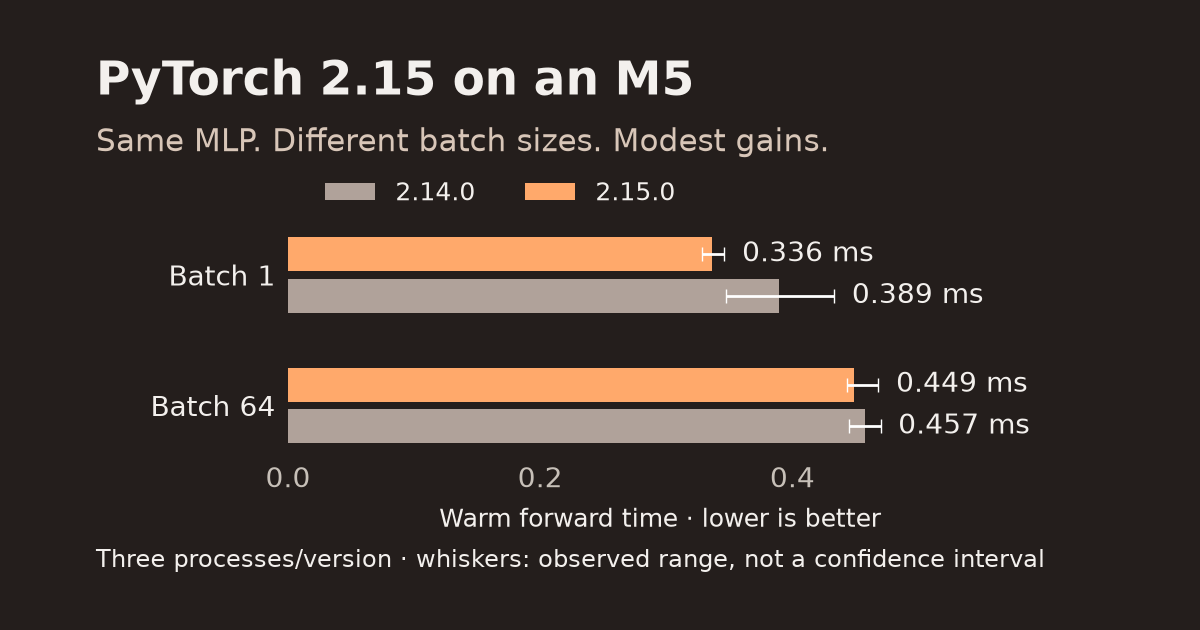
A synchronized M5 microbenchmark compares PyTorch 2.14 and 2.15 with identical FP32 weights and inputs. Separate first forwards from warmed inference, and see why batch size changes the upgrade verdict.
For one small FP32 network on an Apple M5, PyTorch 2.15 was modestly faster at batch 1; at batch 64, the observed process ranges overlapped. Batch size changed how much benefit the upgrade showed.
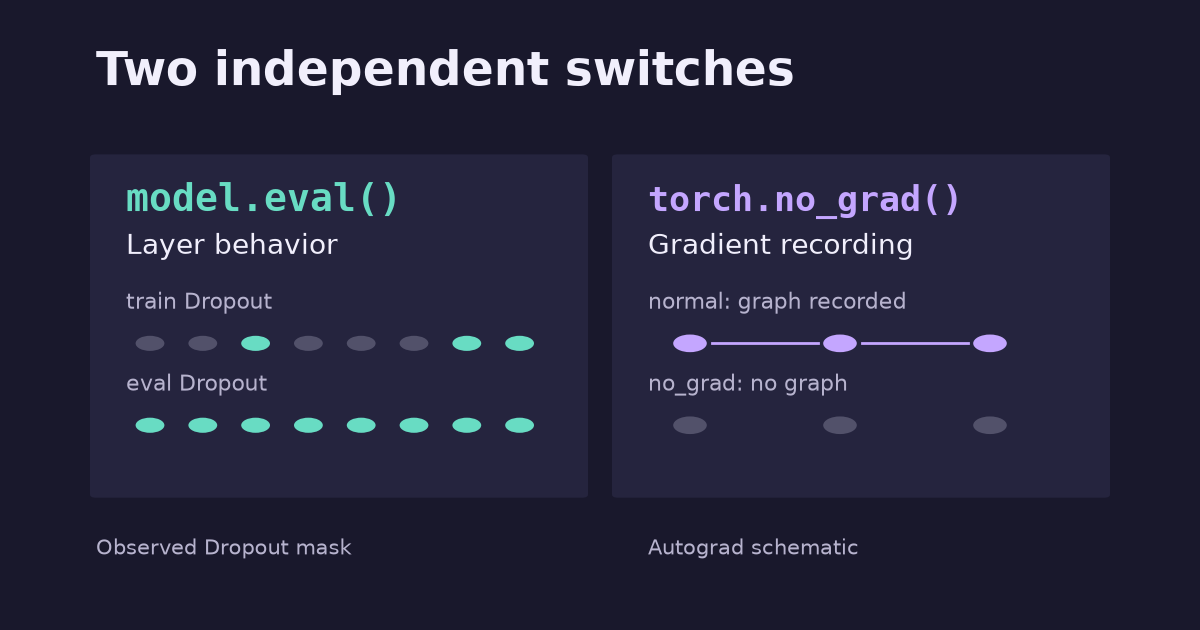
model.eval() changes Dropout and BatchNorm behavior; torch.no_grad() stops reverse-mode gradient recording. Run all four combinations and see why inference usually needs both.
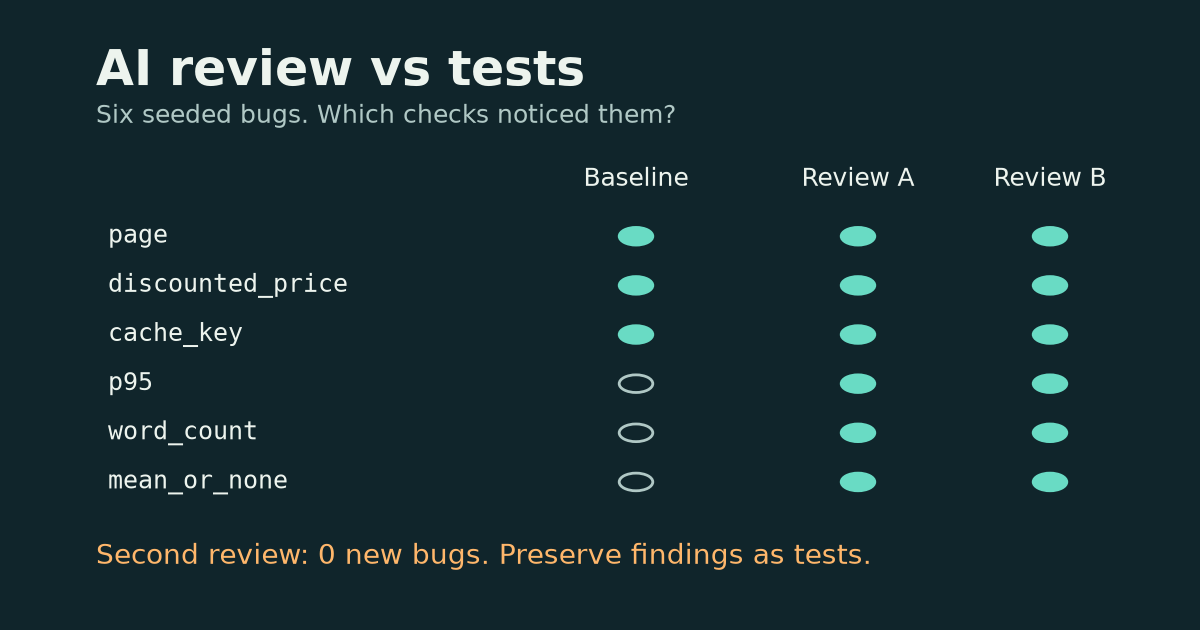
Two independent AI reviews found the same six bugs in a small Python fixture; a baseline test suite caught three. Turn the missing cases into regression tests, then see why a second review is not a replacement for assertions.
An AI review can suggest a case your tests never exercise. A test can check that case every time the code changes. Those are different jobs. Adding another reviewer does not automatically give you another layer of protection.
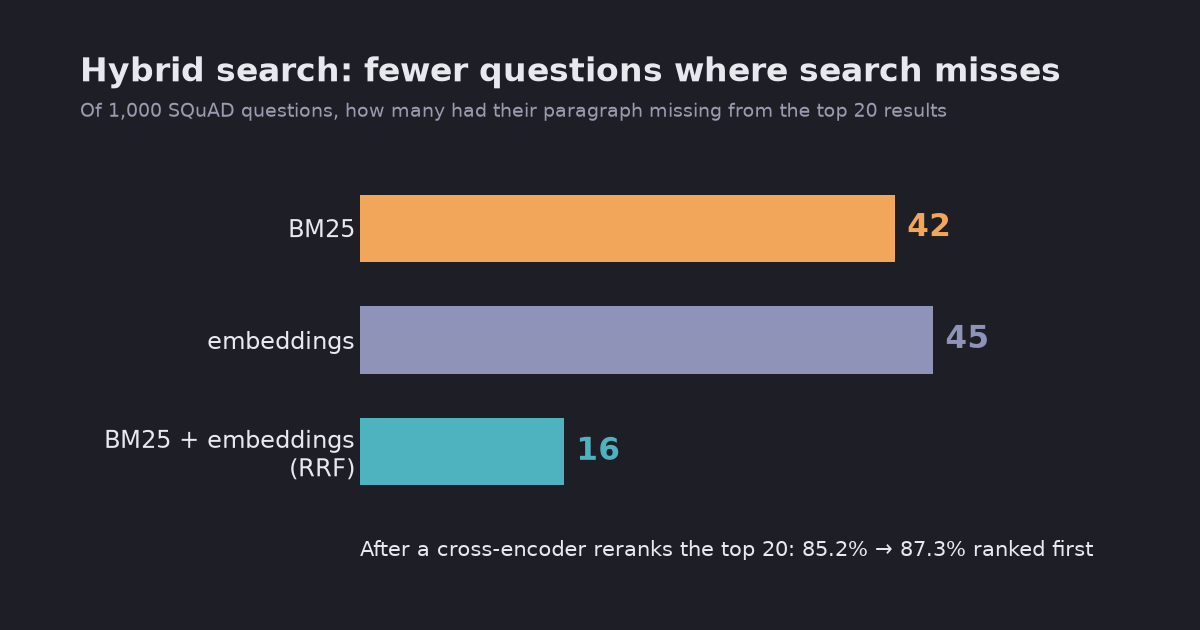
Keyword search (BM25) and embedding search miss different questions. Merging their result lists with reciprocal rank fusion cut the questions whose paragraph was missing from the top 20 from 45 to 16 out of 1,000, and raised top-1 accuracy after reranking from 85.2% to 87.3%. BM25 alone was better at rank 1 than embeddings on this test.
Embedding search finds text with the same meaning. Keyword search finds text with the same words. Hybrid search runs both and merges the two result lists. I measured all three on the same test as the reranking post: 1,000 SQuAD questions, 2,067 paragraphs, and one right paragraph per question.
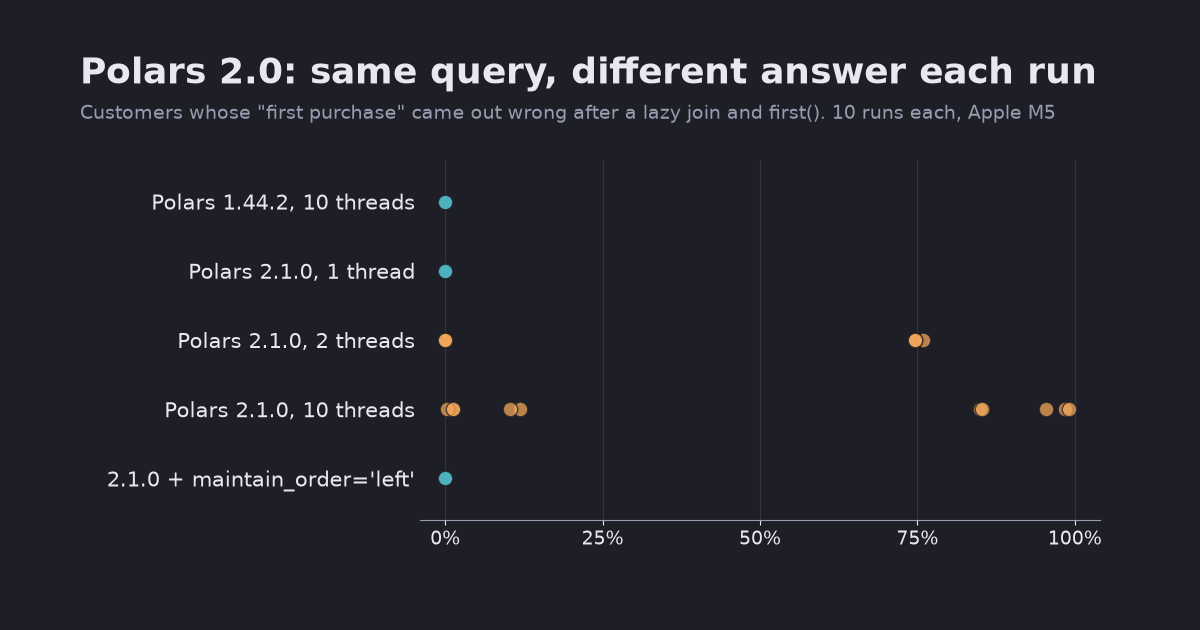
Polars 2.0 runs lazy queries on the streaming engine by default, and joins no longer keep the left row order. A “first purchase per customer” query that was right on 1.44 gave up to 99% wrong rows per run on 2.1. The fixes, plus three other changes that alter results without an error.
Polars 2.0 came out on 2026-10-06, and 2.1 followed on 2026-10-25. The biggest change is in the upgrade guide: LazyFrame.collect() now uses the streaming engine by default. The streaming engine does not promise row order for joins, group-bys or unpivots.
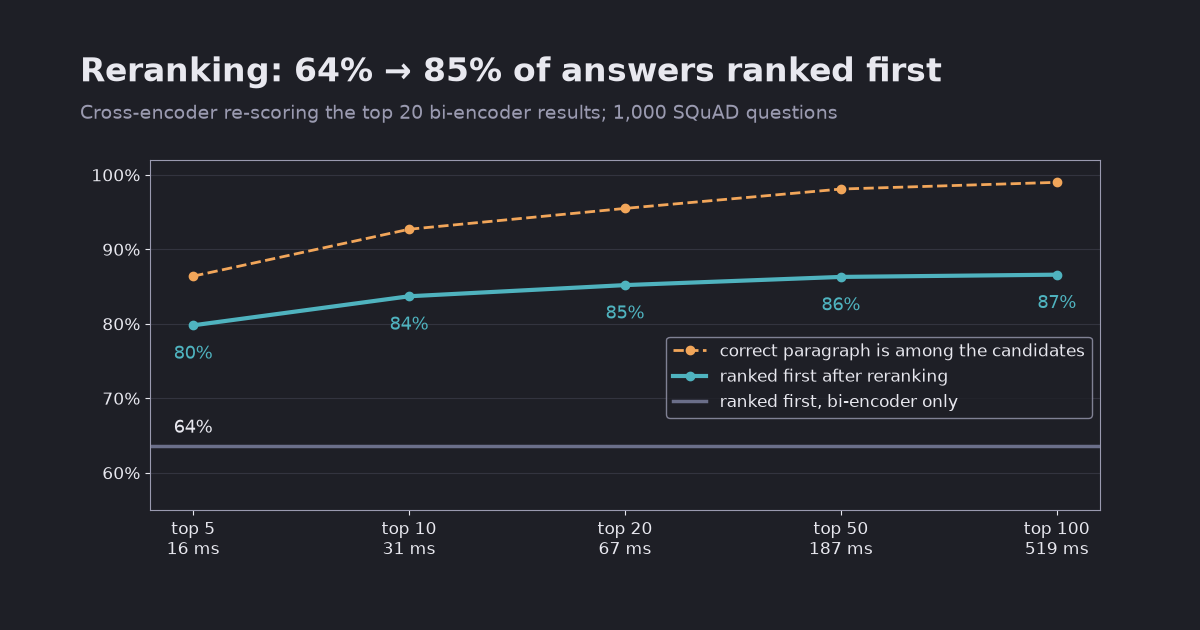
Bi-encoder vs cross-encoder, measured on 1,000 SQuAD questions with two small local models. Re-scoring the top 20 search results moved the right paragraph to first place 85% of the time instead of 64%, for 67 ms per query on a laptop GPU. Past 20 candidates the gain flattened while the cost kept rising.
A RAG system first retrieves the passages most similar to the question and then pastes them into the prompt (RAG in 50 lines). If the right passage is ranked 7th and you only paste the top 3, the model never sees it. A reranker is a second, slower model that re-scores the top results before you cut the list.
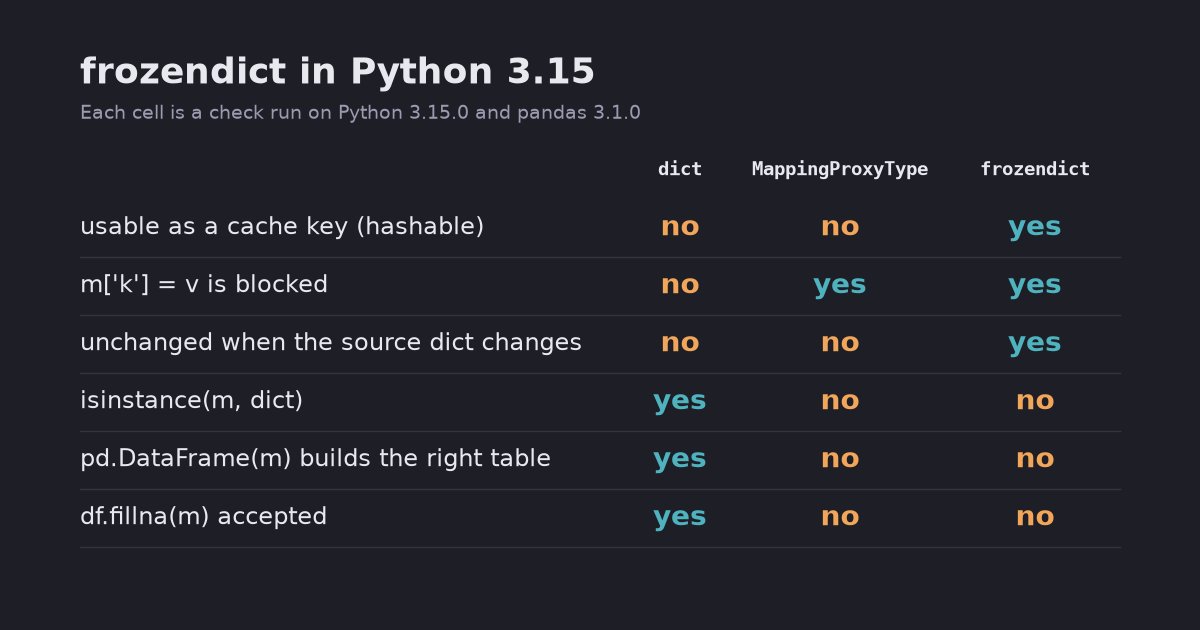
frozendict is an immutable, hashable dict that can be a cache key or a safe default argument. It is not a dict subclass, so pandas 3.1 rejects it in fillna and groupby.agg, and pd.DataFrame(frozendict) silently builds the wrong table. Tested on Python 3.15.0.
Python 3.15 adds frozendict, a built-in dictionary that cannot change after it is created (PEP 814). Because it cannot change, it can be hashed. You can put it in a set, use it as a dict key, or pass it to a function wrapped in functools.cache. A normal dict can do none of these.
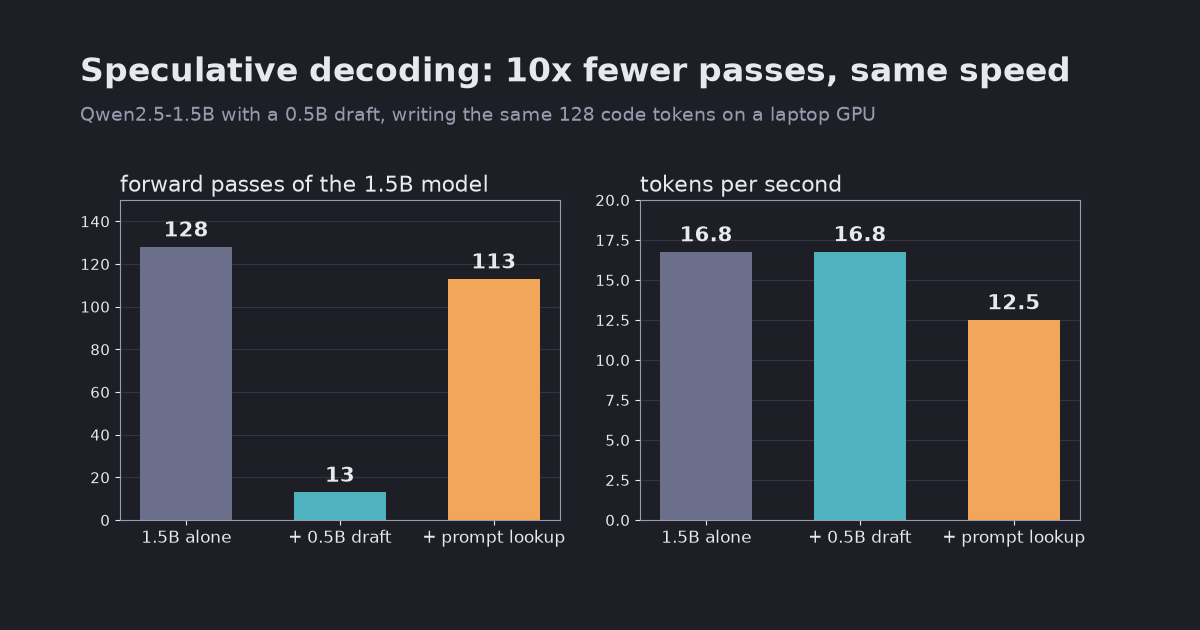
A 0.5B draft model cut Qwen2.5-1.5B’s forward passes from 128 to 13 and produced exactly the same text, but tokens per second did not move. Prompt lookup decoding was 1.30x faster when the answer copied the prompt and slower otherwise. Local transformers test on an Apple M5, with the reasons.
A language model writes one token per forward pass, and for big models each pass is slow. Speculative decoding lets a small, fast draft model guess several tokens ahead, then has the big target model check all of the guesses in a single pass. Every guess the target agrees with is a token it did not need a pass of its own for. With greedy decoding the output is exactly what the target would have written alone.
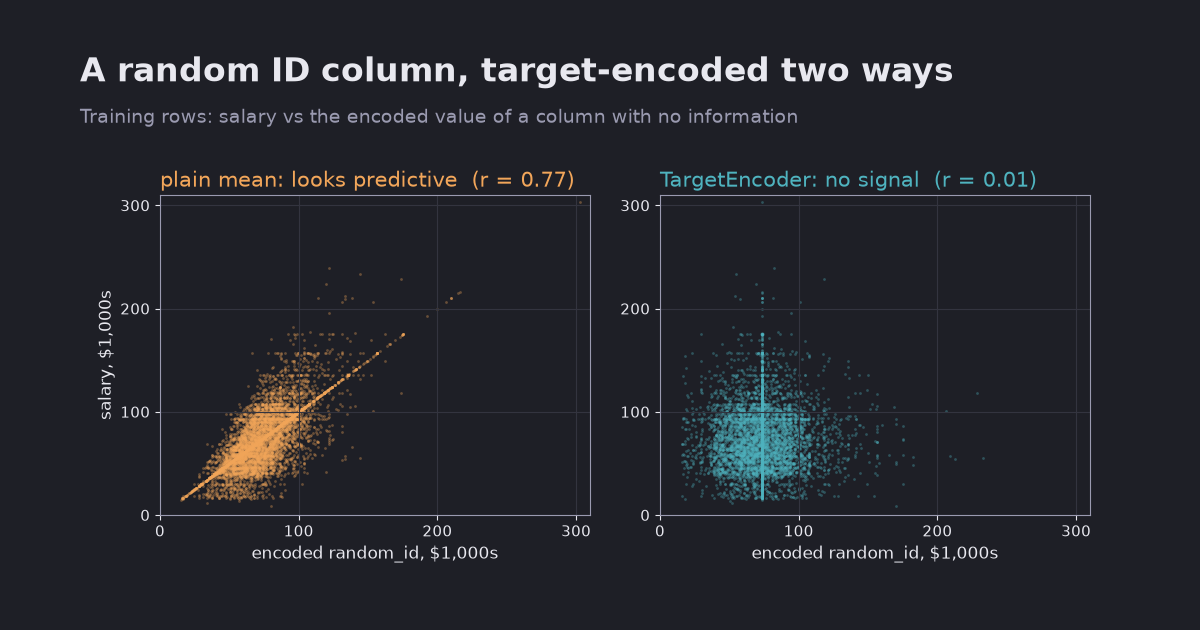
Mean-encoding categories before cross-validation reported an MAE of 4,054 USD; the same model scored 4,636 on a holdout. Inside a pipeline, plain mean encoding was fine until an ID-like column appeared, then TargetEncoder’s cross fitting kept the error flat. Tested with scikit-learn 1.9.1 on real salary data.
Target encoding replaces each category with the average target value of its rows. A job title becomes the average salary of people with that title. It turns a column with hundreds of categories into one useful number, and it is also an easy way to leak the answer into your features.
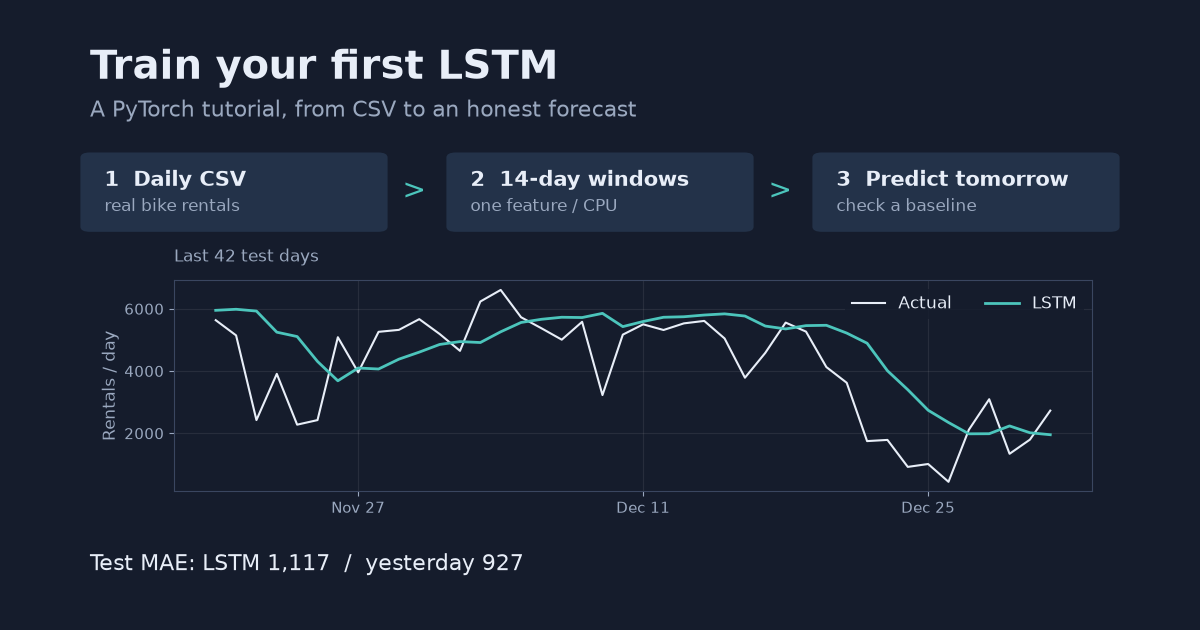
A step-by-step LSTM tutorial using real daily bike rentals: load and plot a CSV, build 3D input windows, train on CPU, and compare next-day predictions with yesterday’s value. Complete runnable Python code included.
By the end of this tutorial, you will have a small LSTM that takes 14 days of bike rentals and predicts the next day, plus plots and an error score you can check against a simple rule. No GPU, account or API key is needed. Basic Python, arrays and the idea of a training set are enough to follow along.