Sorting algorithms, visualized in Python: insertion, bubble, selection and quick sort
Four classic sorting algorithms as Python generators, drawn step by step with pygame. Same input for all of them, real screen recordings, and measured comparisons and swaps: quick sort was fastest on random data and slowest on sorted data.
TL;DR — I wrote a small pygame app that draws every comparison and swap of a sorting algorithm. Each algorithm is a Python generator that yields an event at every step, so the sorting code stays readable. Measured on the same inputs (100 numbers): quick sort needed only 637 comparisons on random data but 4,950 on already sorted data, insertion sort needed just 99 on sorted data, and selection sort always needed 4,950. The full code is on GitHub.
Tested on 2026-10-07 with Python 3.13.11 and pygame 2.6.1 on macOS.
Key points
- Insertion sort grows a sorted part on the left, one element at a time. Very fast on almost-sorted data.
- Bubble sort swaps neighbours until the largest value “bubbles” to the end. It does exactly the same swaps as insertion sort, with more comparisons.
- Selection sort finds the minimum and puts it in place. Always the same number of comparisons, but very few swaps.
- Quick sort splits around a pivot. Fastest on random data, but with the last element as pivot it is at its worst on data that is already sorted.
- Python’s own
sorted()uses none of these: it uses Timsort, which takes advantage of order already in the data.
How do you turn a sorting algorithm into an animation?
Make the algorithm a generator. It sorts the list in place, and at every step it yields a small event saying what just happened. The window takes the next event, colours the two bars involved, and counts comparisons and swaps.
@dataclass
class SortEvent:
    action: str
    left: Optional[int] = None
    right: Optional[int] = None
    message: str = ""
The sorting functions never touch pygame, and the drawing code never knows which algorithm is running. That split is what makes it easy to add an algorithm: write a generator and add it to a list.
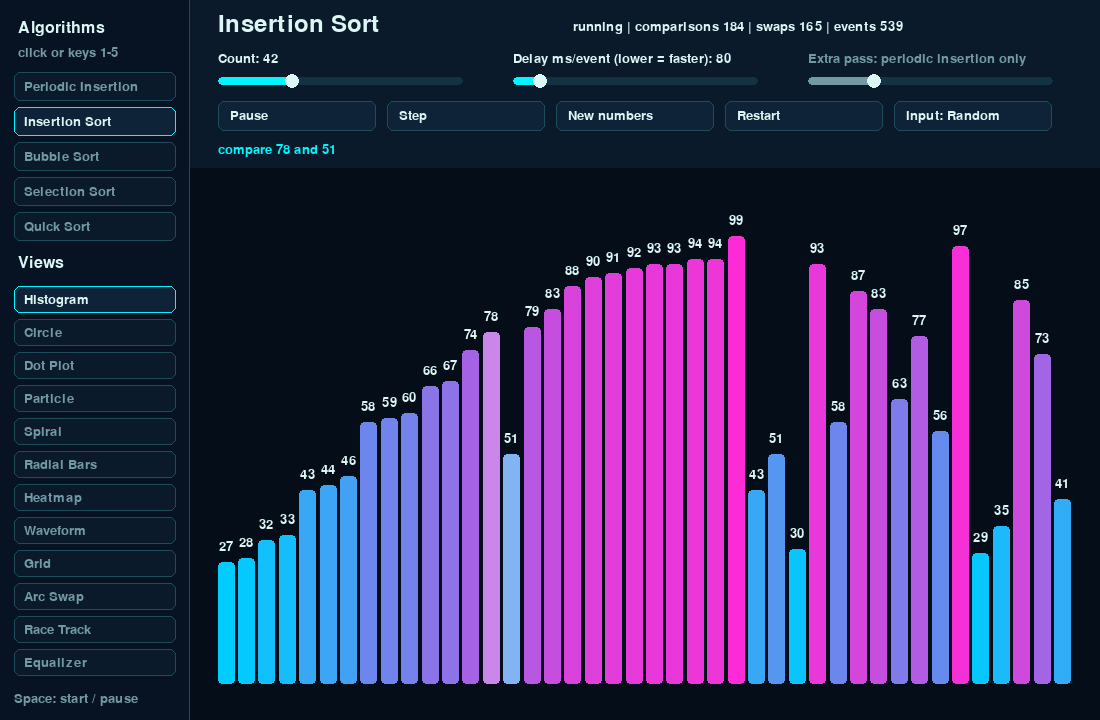
Every video below sorts the same 42 random numbers, so you can compare them directly. The counter at the top right of each frame is the real count for that run.
How does insertion sort work?
Take the next number and slide it left until the number before it is not bigger. The left part is always sorted; each new number is inserted into it.
def insertion_sort(arr: list[int]) -> Generator[SortEvent, None, None]:
    for i in range(1, len(arr)):
        j = i
        yield SortEvent("insert", j, None, f"insert index {i}")

        while j > 0:
            yield SortEvent("compare", j - 1, j, f"compare {arr[j - 1]} and {arr[j]}")
            if arr[j - 1] <= arr[j]:
                break

            yield SortEvent("swap", j - 1, j, f"swap {arr[j - 1]} and {arr[j]}")
            arr[j - 1], arr[j] = arr[j], arr[j - 1]
            yield SortEvent("after_swap", j - 1, j, "after swap")
            j -= 1

    yield from finish_sweep(arr)
    yield SortEvent("done", None, None, "sorted")
On this input: 504 comparisons, 469 swaps. The <= in the break line matters: equal values stop the slide, so they keep their original order. That makes insertion sort stable.
How does bubble sort work?
Walk through the list and swap any two neighbours that are in the wrong order. After one pass the largest value has reached the end, so the next pass can stop one place earlier. If a pass makes no swap, the list is sorted.
def bubble_sort(arr: list[int]) -> Generator[SortEvent, None, None]:
    n = len(arr)

    for end in range(n - 1, 0, -1):
        swapped = False
        yield SortEvent("pass", 0, end, f"bubble pass up to index {end}")

        for i in range(end):
            yield SortEvent("compare", i, i + 1, f"compare {arr[i]} and {arr[i + 1]}")
            if arr[i] > arr[i + 1]:
                yield SortEvent("swap", i, i + 1, f"swap {arr[i]} and {arr[i + 1]}")
                arr[i], arr[i + 1] = arr[i + 1], arr[i]
                swapped = True
                yield SortEvent("after_swap", i, i + 1, "after swap")

        if not swapped:
            break

    yield from finish_sweep(arr)
    yield SortEvent("done", None, None, "sorted")
On this input: 846 comparisons and 469 swaps, exactly the same as insertion sort. That is not a coincidence. Both only swap neighbours that are out of order, and each such swap fixes exactly one out-of-order pair. So both make as many swaps as there are out-of-order pairs in the input. Bubble sort just compares more to find them.
How does selection sort work?
Scan the unsorted part for the smallest value, then swap it into the next position. One swap per position at most.
def selection_sort(arr: list[int]) -> Generator[SortEvent, None, None]:
    n = len(arr)

    for i in range(n - 1):
        min_index = i
        yield SortEvent("select", i, min_index, f"select minimum for index {i}")

        for j in range(i + 1, n):
            yield SortEvent("compare", min_index, j, f"compare {arr[min_index]} and {arr[j]}")
            if arr[j] < arr[min_index]:
                min_index = j
                yield SortEvent("select", i, min_index, f"new minimum {arr[min_index]}")

        if min_index != i:
            yield SortEvent("swap", i, min_index, f"swap {arr[i]} and {arr[min_index]}")
            arr[i], arr[min_index] = arr[min_index], arr[i]
            yield SortEvent("after_swap", i, min_index, "after swap")

    yield from finish_sweep(arr)
    yield SortEvent("done", None, None, "sorted")
On this input: 861 comparisons but only 41 swaps. The comparisons never change: for 42 numbers it always checks 41 + 40 + … + 1 = 861 pairs, sorted input or not. Selection sort makes sense when writing (swapping) is much more expensive than reading.
How does quick sort work?
Pick a pivot (here: the last element). Move everything smaller than or equal to it to the left, put the pivot right after them, and it is now in its final place. Then do the same for the left part and the right part.
def quick_sort(arr: list[int]) -> Generator[SortEvent, None, None]:
    def partition(low: int, high: int) -> Generator[SortEvent, None, int]:
        pivot = arr[high]
        i = low
        yield SortEvent("pivot", high, None, f"pivot {pivot}")

        for j in range(low, high):
            yield SortEvent("compare", j, high, f"compare {arr[j]} and pivot {pivot}")
            if arr[j] <= pivot:
                if i != j:
                    yield SortEvent("swap", i, j, f"move {arr[j]} before pivot")
                    arr[i], arr[j] = arr[j], arr[i]
                    yield SortEvent("after_swap", i, j, "after swap")
                i += 1

        if i != high:
            yield SortEvent("swap", i, high, f"place pivot {pivot}")
            arr[i], arr[high] = arr[high], arr[i]
            yield SortEvent("after_swap", i, high, "after swap")

        return i

    def sort_range(low: int, high: int) -> Generator[SortEvent, None, None]:
        if low >= high:
            return

        yield SortEvent("pass", low, high, f"quick sort range {low}..{high}")
        pivot_index = yield from partition(low, high)
        yield from sort_range(low, pivot_index - 1)
        yield from sort_range(pivot_index + 1, high)

    yield from sort_range(0, len(arr) - 1)
    yield from finish_sweep(arr)
    yield SortEvent("done", None, None, "sorted")
On this input: only 202 comparisons and 73 swaps, by far the fewest. One detail I like in the code: pivot_index = yield from partition(low, high). A generator can return a value, and yield from hands it back to the caller, so partition can stream its events and report where the pivot ended up.
Which one is fastest? Comparisons and swaps measured
One run is not enough, so I counted comparisons and swaps for 100 numbers, averaged over 20 different arrays for each type of input. The script is count_ops.py in the repository:
import os
import random

os.environ["SDL_VIDEODRIVER"] = "dummy"
import sort_visualizer as sv

N, RUNS = 100, 20


def make(pattern, rng):
    data = [rng.randint(20, 100) for _ in range(N)]
    if pattern == "reversed":
        return sorted(data, reverse=True)
    if pattern == "sorted":
        return sorted(data)
    if pattern == "few unique":
        return [rng.choice((20, 40, 60, 80, 100)) for _ in range(N)]
    return data


def count(algorithm, arr):
    compares = swaps = 0
    for event in algorithm(arr):
        compares += event.action == "compare"
        swaps += event.action == "swap"
    return compares, swaps


patterns = ("random", "reversed", "sorted", "few unique")
print(f"n={N}, mean of {RUNS} arrays per input (compares / swaps)")
print(f"{'algorithm':20s}" + "".join(f"{p:>18s}" for p in patterns))
for name, algorithm in sv.ALGORITHMS:
    cells = []
    for p in patterns:
        rng = random.Random(42)
        c = s = 0
        for _ in range(RUNS):
            ci, si = count(algorithm, make(p, rng))
            c, s = c + ci, s + si
        cells.append(f"{c / RUNS:,.0f} / {s / RUNS:,.0f}")
    print(f"{name:20s}" + "".join(f"{x:>18s}" for x in cells))
Output:
n=100, mean of 20 arrays per input (compares / swaps)
algorithm                       random          reversed            sorted        few unique
Periodic Insertion       3,753 / 2,481     6,107 / 4,888         1,275 / 0     3,262 / 1,988
Insertion Sort           2,577 / 2,481     4,931 / 4,888            99 / 0     2,086 / 1,988
Bubble Sort              4,874 / 2,481     4,950 / 4,888            99 / 0     4,705 / 1,988
Selection Sort              4,950 / 94        4,950 / 62         4,950 / 0        4,950 / 77
Quick Sort                   637 / 257        3,214 / 62         4,950 / 0       1,235 / 119
The same numbers as a table (comparisons, 100 numbers):
| Algorithm | Random | Reversed | Already sorted | Few unique values |
|---|---|---|---|---|
| Insertion | 2,577 | 4,931 | 99 | 2,086 |
| Bubble | 4,874 | 4,950 | 99 | 4,705 |
| Selection | 4,950 | 4,950 | 4,950 | 4,950 |
| Quick (last element as pivot) | 637 | 3,214 | 4,950 | 1,235 |
What surprised me:
- Quick sort is the best and the worst in the same table. On sorted input the last element is always the largest, so every partition removes just one element and quick sort does all 4,950 comparisons. Real implementations avoid this with a random pivot or the median of three.
- Insertion sort beats everything on sorted data with 99 comparisons, one per element. Using order that is already there is also the idea behind Timsort, Python’s built-in sort.
- Selection sort never adapts. 4,950 = 100 × 99 / 2 in every column.
What about “periodic insertion”?
The app has a fifth option: insertion sort with an extra bubble pass every N insertions. It is not a standard algorithm. I added it to check an idea, and the table answers it: the extra pass adds about 1,200 comparisons on random data and saves zero swaps (2,481 either way). The part on the left is already sorted after each insertion, so the extra pass never finds anything to fix.
Run it yourself
git clone https://github.com/zayunsna/sorting-visualizer.git
cd sorting-visualizer
python3 -m pip install -r requirements.txt
./run.sh               # opens the window
python3 test_sorts.py  # checks every algorithm against sorted()
python3 count_ops.py   # prints the table above
Keys: 1–5 choose the algorithm, Space starts and pauses, → steps one event, N makes new numbers, and the Input button switches between random, reversed, sorted and few-unique data. Try quick sort on Sorted input and watch it slow down. There are also 12 view styles (circle, spiral, heatmap, …) on the left.
When to use which?
| Situation | Choice |
|---|---|
| Real Python code | sorted() or list.sort(). Always |
| Small or almost-sorted data | Insertion sort |
| Writing to memory is expensive, reading is cheap | Selection sort (fewest swaps) |
| Large random data, your own implementation | Quick sort with a random or median-of-three pivot |
| Teaching the idea of “out-of-order pairs” | Bubble sort, next to insertion sort |
Sources
- Sorting Techniques — Python documentation (Timsort in Python), checked 2026-10-07
- Full source code: github.com/zayunsna/sorting-visualizer (MIT License)
Related: Self-attention from scratch in NumPy (checked against PyTorch)