How to use MinMaxScaler in scikit-learn: fit, transform, and inverse_transform
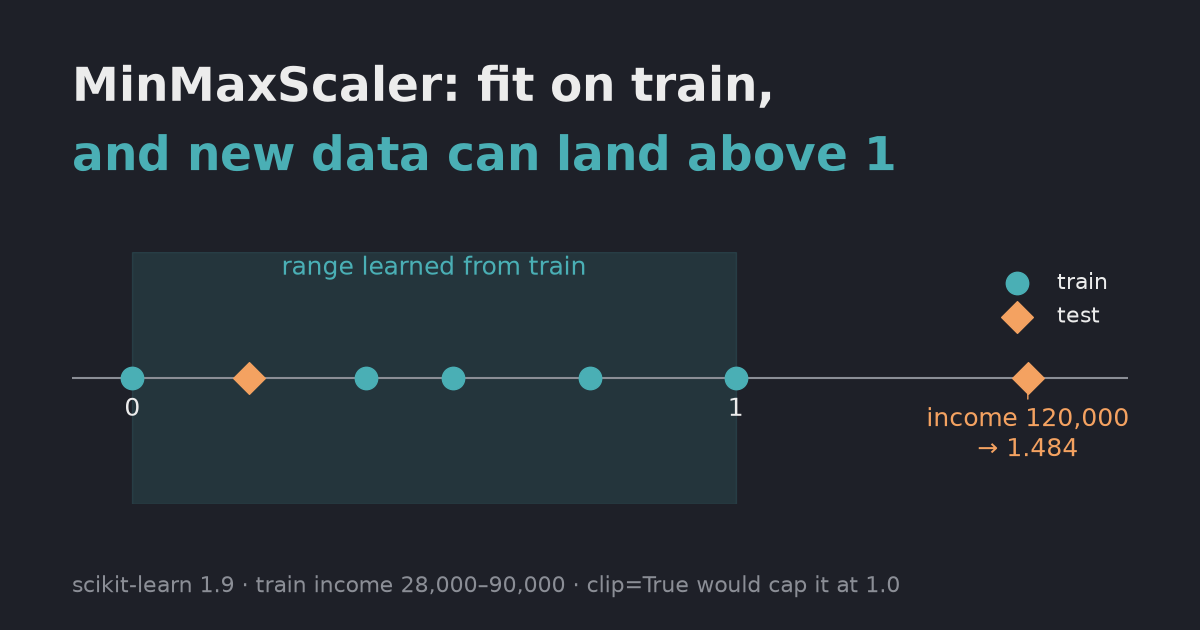
MinMaxScaler step by step with real output: fit on training data only, why new values go above 1, the 1D-array error, how to inverse_transform a single predicted column, NaN handling, and keeping DataFrame column names.
MinMaxScaler learns each column’s minimum and maximum with fit, then maps values to [0, 1] with (x - min) / (max - min). Fit it on the training data only, and use the same fitted scaler for test data and for turning predictions back into real units. Most problems come from breaking one of those two rules.
If you’re still choosing between scalers, start with min-max scaling vs standardization. This post is about using MinMaxScaler once you’ve picked it.
Tested on 2026-10-08 with scikit-learn 1.9.1, pandas 3.0.6, NumPy 2.5.3 and Python 3.12.13. The blocks below are one script; run them in order.
How do fit and transform work?
import numpy as np
import pandas as pd
import sklearn
from sklearn.preprocessing import MinMaxScaler

np.set_printoptions(precision=3, suppress=True)
train = pd.DataFrame({"age": [22, 35, 47, 51, 62], "income": [28_000, 52_000, 61_000, 75_000, 90_000]})
test = pd.DataFrame({"age": [30, 70], "income": [40_000, 120_000]})

# 1. Basic use: learn min and max on train, apply to train and test
scaler = MinMaxScaler()
train_scaled = scaler.fit_transform(train)
print("data_min_:", scaler.data_min_, "| data_max_:", scaler.data_max_)
print("train scaled:\n", train_scaled)
print("test scaled (age 70 and income 120,000 are above the train max):\n", scaler.transform(test))
data_min_: [   22. 28000.] | data_max_: [   62. 90000.]
train scaled:
 [[0.    0.   ]
 [0.325 0.387]
 [0.625 0.532]
 [0.725 0.758]
 [1.    1.   ]]
test scaled (age 70 and income 120,000 are above the train max):
 [[0.2   0.194]
 [1.2   1.484]]
fit stores one minimum and one maximum per column (data_min_, data_max_). Each column is scaled on its own, so age and income both end up between 0 and 1 on the training data.
The test row with age 70 became 1.2, and income 120,000 became 1.484. That is not a bug. The scaler only knows the training range, so anything bigger than the training maximum lands above 1, and anything smaller than the minimum lands below 0.
Why do I get “Expected 2D array, got 1D array instead”?
# 2. A 1D array is rejected
try:
    MinMaxScaler().fit_transform(np.array([22, 35, 47, 51, 62]))
except ValueError as e:
    print("1D input ->", str(e).splitlines()[0])
print("reshape(-1, 1) ->", MinMaxScaler().fit_transform(np.array([22, 35, 47, 51, 62]).reshape(-1, 1)).ravel())
1D input -> Expected 2D array, got 1D array instead:
reshape(-1, 1) -> [0.    0.325 0.625 0.725 1.   ]
scikit-learn expects a table: rows are samples, columns are features. One column of values has to be shaped (n, 1) with reshape(-1, 1). With pandas, df[["age"]] (double brackets) gives a one-column DataFrame and works directly. df["age"] is a Series and also fails, with a different message: Expected a 2-dimensional container but got <class 'pandas.Series'> instead.
What happens if you fit on the test data too?
# 3. Fitting again on test data silently changes the meaning of 0 and 1
print("fit on test instead:\n", MinMaxScaler().fit_transform(test))
fit on test instead:
 [[0. 0.]
 [1. 1.]]
No error, but the numbers mean something else now. With only two test rows, whichever is smaller becomes 0 and the other becomes 1, so an income of 40,000 and one of 120,000 look like the two ends of the scale. A model trained on the first scaling sees inputs it can’t interpret. Call fit (or fit_transform) once on the training data and only transform afterwards. Fitting on all data before splitting is the same mistake in a quieter form; see data leakage in preprocessing.
How do you keep new values between 0 and 1?
# 4. clip=True keeps new data inside feature_range
print("clip=True on test:\n", MinMaxScaler(clip=True).fit(train).transform(test))
clip=True on test:
 [[0.2   0.194]
 [1.    1.   ]]
clip=True (available since scikit-learn 0.24) caps transformed values at the edges of feature_range. Use it when a model behaves badly with out-of-range inputs, but know the trade-off: 1.2 and 1.484 both became 1.0, so the difference between them is gone, and the documentation notes that inverse_transform may not restore the original data. If test values often land outside the range, the data has shifted and that is worth checking on its own.
How do you inverse_transform a single predicted column?
A common setup: you scaled several columns, trained a model to predict one of them (say income), and now want the prediction back in real units.
# 5. Undo the scaling for one predicted column
pred_income_scaled = np.array([[0.5], [1.2]])
try:
    scaler.inverse_transform(pred_income_scaled)
except ValueError as e:
    print("inverse_transform on 1 column ->", str(e).splitlines()[0])
i = list(train.columns).index("income")
print("manual inverse for income:", pred_income_scaled.ravel() * (scaler.data_max_[i] - scaler.data_min_[i]) + scaler.data_min_[i])
income_scaler = MinMaxScaler().fit(train[["income"]])          # or keep a scaler per target column
print("separate target scaler:", income_scaler.inverse_transform(pred_income_scaled).ravel())
inverse_transform on 1 column -> non-broadcastable output operand with shape (2,1) doesn't match the broadcast shape (2,2)
manual inverse for income: [ 59000. 102400.]
separate target scaler: [ 59000. 102400.]
inverse_transform expects the same number of columns the scaler was fitted on, here two. Two fixes give the same answer:
- Invert by hand with that column’s
data_min_anddata_max_:x_scaled * (max - min) + min. - Fit a separate scaler for the target column only, and use it for both scaling the target and inverting predictions. This is the cleaner choice when you set up the pipeline.
What does MinMaxScaler do with NaN?
# 6. NaN is ignored when fitting and kept when transforming
with_nan = pd.DataFrame({"age": [22, np.nan, 47, 62]})
print("NaN input ->", MinMaxScaler().fit_transform(with_nan).ravel())
NaN input -> [0. nan 0.625 1. ]
Missing values are skipped when the minimum and maximum are learned, and they stay NaN in the output. The scaler doesn’t fill them, so impute before or after scaling depending on what your model needs.
How do you get a DataFrame back?
# 7. Keep DataFrame column names
df_out = MinMaxScaler().set_output(transform="pandas").fit_transform(train)
print(type(df_out).__name__, list(df_out.columns))
print(df_out.round(3).to_string())
print("scikit-learn", sklearn.__version__, "| pandas", pd.__version__, "| numpy", np.__version__)
DataFrame ['age', 'income']
     age  income
0  0.000   0.000
1  0.325   0.387
2  0.625   0.532
3  0.725   0.758
4  1.000   1.000
scikit-learn 1.9.1 | pandas 3.0.6 | numpy 2.5.3
By default the output is a NumPy array and the column names are gone. set_output(transform="pandas") returns a DataFrame with the original column names, which makes the next steps easier to read and debug.
Quick reference
| Problem | Fix |
|---|---|
Expected 2D array, got 1D array instead (or Expected a 2-dimensional container) | x.reshape(-1, 1) or df[["col"]] |
| Test values above 1 or below 0 | Expected for values outside the training range; clip=True if you must cap them |
| Scaled test data looks wrong | You fitted on test data; fit on train once, then only transform |
non-broadcastable output operand in inverse_transform | Invert one column by hand, or use a separate scaler for the target |
| NaN in the output | MinMaxScaler keeps NaN; impute separately |
| Lost column names | set_output(transform="pandas") |