Min-max scaling vs standardization: when should you use which?
MinMaxScaler or StandardScaler? A tested answer with scikit-learn: which models need scaling at all, what outliers do to each scaler, and when RobustScaler is the better pick.
TL;DR — Use standardization (StandardScaler) as the default for distance- and gradient-based models, and min-max scaling (MinMaxScaler) when you need values in a fixed range such as 0 to 1. If your data has outliers, neither works well; use RobustScaler. Tree-based models don’t need scaling at all.
Tested on 2026-09-28 with scikit-learn 1.9.1, NumPy 2.5.3, Python 3.12.
Key points
- Min-max scaling maps each feature to a fixed range, 0 to 1 by default:
(x - min) / (max - min). - Standardization gives each feature a mean of 0 and a standard deviation of 1:
(x - mean) / std. - Both work column by column. Each feature is scaled on its own, not each row.
- Both are hurt by outliers. One extreme value squeezes all normal values into a tiny range.
- Scaling matters for KNN, SVM, linear models, and neural networks. It makes no difference to decision trees and random forests.
What is the difference between min-max scaling and standardization?
They answer different questions. Min-max scaling asks “where is this value between the smallest and the largest?” Standardization asks “how many standard deviations is this value from the mean?”
| Min-max scaling | Standardization | |
|---|---|---|
| scikit-learn class | MinMaxScaler | StandardScaler |
| Formula | (x - min) / (max - min) | (x - mean) / std |
| Output range | Fixed, 0 to 1 by default | Not fixed, usually about -3 to 3 |
| Uses | The two most extreme values | Every value, through the mean and std |
| Good fit | Pixel values, bounded inputs, neural nets expecting 0–1 | Default for KNN, SVM, linear and logistic regression, PCA |
Both scalers work per column. A quick check with three columns on different scales:
import numpy as np
from sklearn.preprocessing import MinMaxScaler

data = np.array([[1, 0.1, 0.3], [4, 6.7, 6.0], [7, 18.0, 29.0]])
print(MinMaxScaler().fit_transform(data).round(3))
[[0.    0.    0.   ]
 [0.5   0.369 0.199]
 [1.    1.    1.   ]]
Every column now runs from 0 to 1. The rows do not.
Which models actually need scaling?
Models that compare distances or use gradient descent need it. Tree-based models don’t, because a tree only asks “is this value above a threshold?”, and scaling doesn’t change the order of values.
The wine dataset is a good test: magnesium ranges from 70 to 162, while proline ranges from 278 to 1680. Without scaling, proline dominates every distance.
from sklearn.datasets import load_wine
from sklearn.ensemble import RandomForestClassifier
from sklearn.model_selection import cross_val_score
from sklearn.neighbors import KNeighborsClassifier
from sklearn.pipeline import make_pipeline
from sklearn.preprocessing import MinMaxScaler, StandardScaler

X, y = load_wine(return_X_y=True)

models = {"KNN": KNeighborsClassifier(), "Random forest": RandomForestClassifier(random_state=0)}
scalers = {"no scaling": None, "MinMaxScaler": MinMaxScaler(), "StandardScaler": StandardScaler()}

for model_name, model in models.items():
    for scaler_name, scaler in scalers.items():
        pipe = make_pipeline(scaler, model) if scaler else model
        acc = cross_val_score(pipe, X, y, cv=5).mean()
        print(f"{model_name:>13} | {scaler_name:<14} | accuracy {acc:.3f}")
          KNN | no scaling     | accuracy 0.691
          KNN | MinMaxScaler   | accuracy 0.950
          KNN | StandardScaler | accuracy 0.949
Random forest | no scaling     | accuracy 0.983
Random forest | MinMaxScaler   | accuracy 0.983
Random forest | StandardScaler | accuracy 0.983
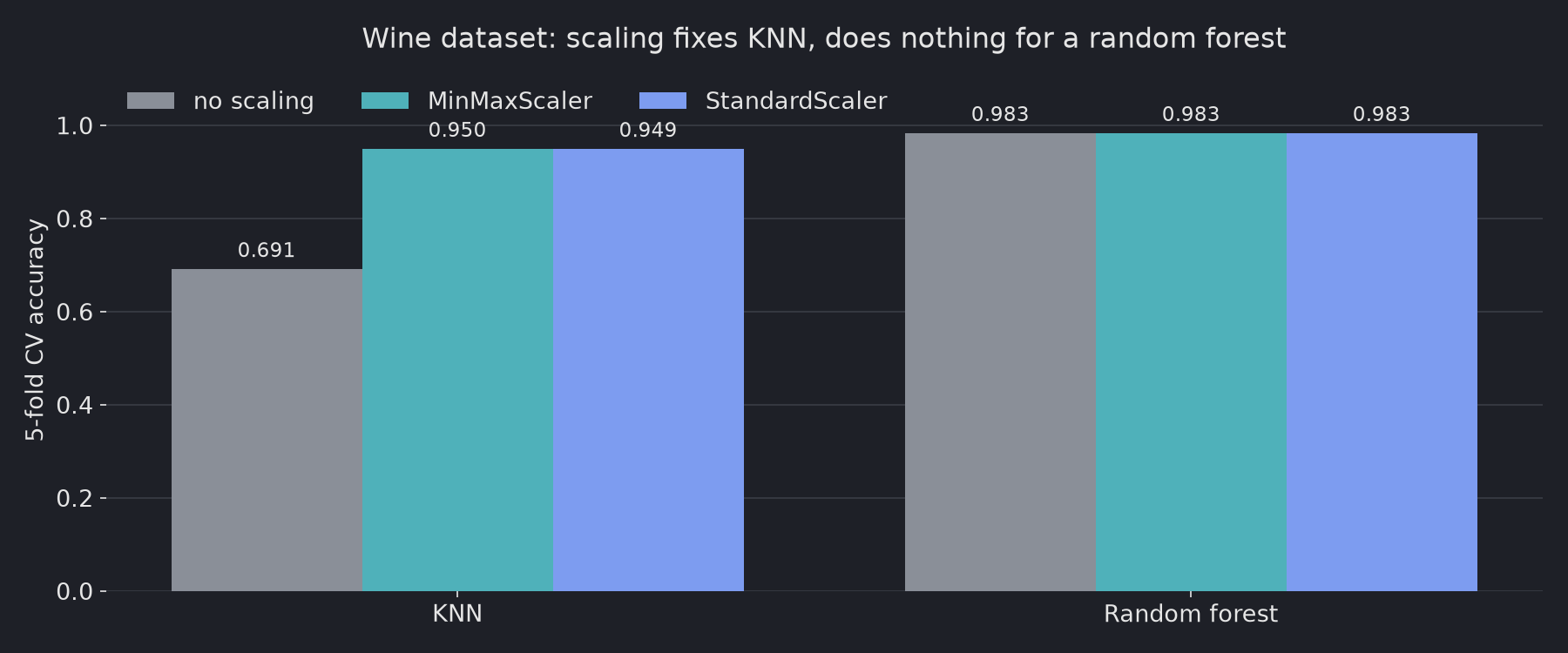
Scaling lifts KNN from 0.691 to 0.950. The random forest scores 0.983 either way. On this dataset, the choice between the two scalers barely matters (0.950 vs 0.949). What matters is scaling at all.
The scaler sits inside make_pipeline, so it is fitted on the training folds only. Fitting it on the full dataset before splitting leaks information from the test data.
What happens when there are outliers?
Both scalers break down, and standardization is not the fix people often expect. Here are eight monthly salaries (in $1,000) with one extreme value:
import numpy as np
from sklearn.preprocessing import MinMaxScaler, StandardScaler, RobustScaler

salary = np.array([[3.1], [3.4], [3.8], [4.0], [4.2], [4.5], [5.0], [60.0]])

for scaler in [MinMaxScaler(), StandardScaler(), RobustScaler()]:
    out = scaler.fit_transform(salary).ravel()
    print(f"{type(scaler).__name__:>14}: {np.round(out, 2)}")
  MinMaxScaler: [0.   0.01 0.01 0.02 0.02 0.02 0.03 1.  ]
StandardScaler: [-0.43 -0.41 -0.39 -0.38 -0.37 -0.35 -0.32  2.64]
  RobustScaler: [-1.08 -0.76 -0.32 -0.11  0.11  0.43  0.97 60.43]
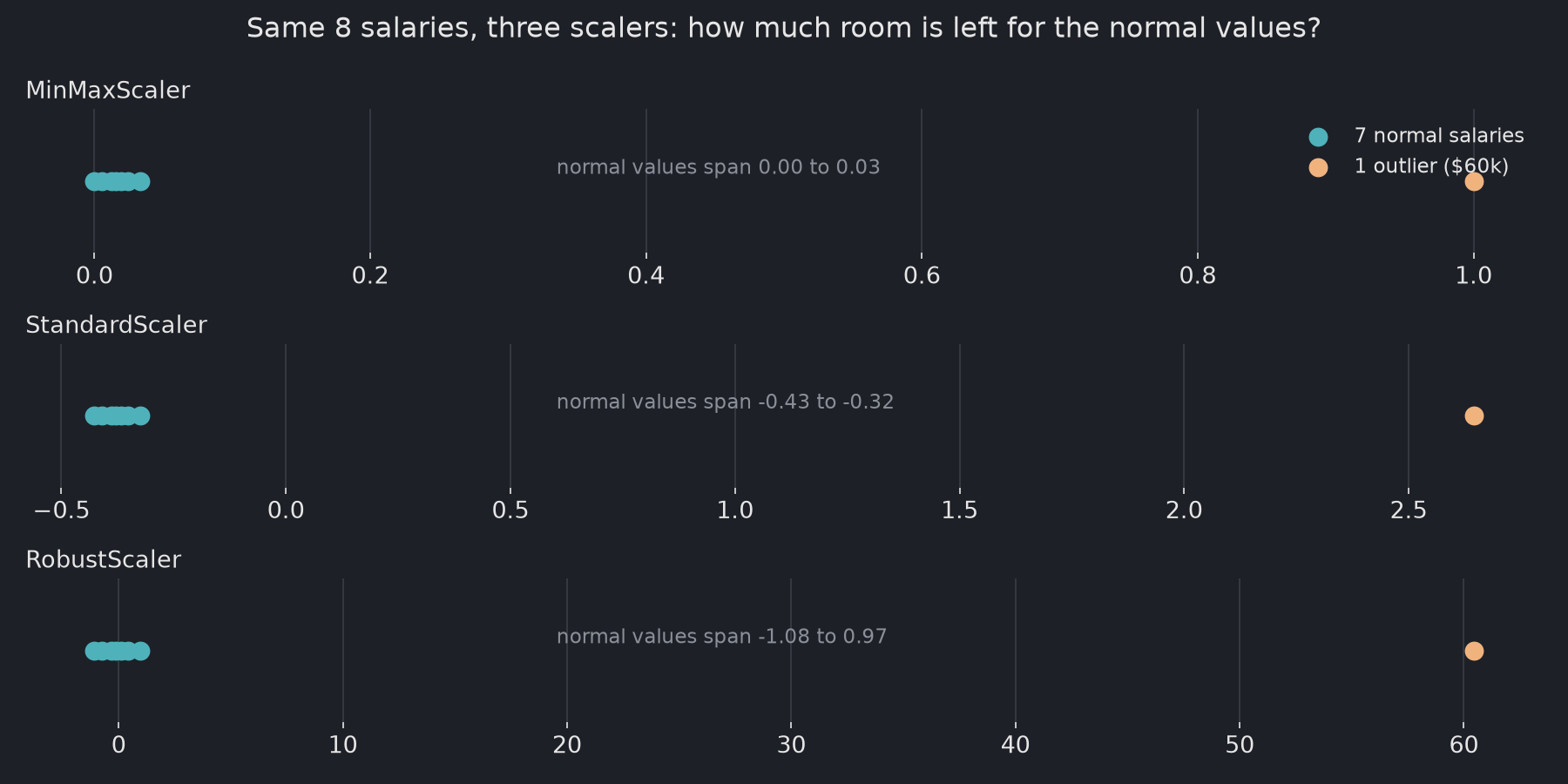
- MinMaxScaler squeezes the seven normal salaries into 0.00–0.03. The outlier takes the whole range.
- StandardScaler squeezes them into -0.43 to -0.32. The outlier inflates the standard deviation, so everything else shrinks.
- RobustScaler keeps them spread from -1.08 to 0.97. It uses the median and the interquartile range, which one extreme value can’t move.
The scikit-learn documentation shows the same effect on the California housing data.
Which scaler should you choose?
| Situation | Use |
|---|---|
| Tree-based model (decision tree, random forest, gradient boosting) | No scaling needed |
| KNN, SVM, linear or logistic regression, PCA, neural networks | StandardScaler as the default |
| You need a fixed range, e.g. 0–1 inputs or image pixels | MinMaxScaler |
| The feature has outliers you want to keep | RobustScaler |
Common mistakes
- Fitting the scaler on all data before the train/test split. Fit on the training data only, or use a
Pipeline. - Scaling a single 1-D array. Scalers expect 2-D input, so use
x.reshape(-1, 1). - Expecting
StandardScalerto handle outliers. As shown above, it doesn’t. UseRobustScaleror deal with the outliers first. - Forgetting to scale new data the same way. Call
transform()(notfit_transform()) on validation, test, and production data.
Sources
- Compare the effect of different scalers on data with outliers — scikit-learn docs
- Preprocessing data — scikit-learn user guide
Related: MinMaxScaler 사용법 — fit, inverse_transform, and data_min_ (in Korean)