How to show a progress bar in GridSearchCV (scikit-learn 1.9 callbacks)
scikit-learn 1.9 added experimental callbacks: ProgressBar for GridSearchCV and Pipeline, and ScoringMonitor for per-iteration training scores. Tested on 1.9.1, including the missing rich dependency.
TL;DR — Since scikit-learn 1.9, you can call grid_search.set_callbacks(ProgressBar()) before fit() to get live progress bars for every candidate and fold. Install rich first (pip install rich), or you get an ImportError. The feature is experimental and works only on a handful of estimators so far.
Tested on 2026-09-28 with scikit-learn 1.9.1 (released 2026-09-10), rich 15.0.0, Python 3.12. Callbacks first shipped in 1.9.0 on 2026-06-02.
Key points
- Callbacks are new and experimental. The API “may change without the usual deprecation cycle”, according to the scikit-learn docs.
- Two built-in callbacks:
ProgressBarshows progress, andScoringMonitorlogs a score at each step offit. ProgressBarneeds therichpackage. It is not installed with scikit-learn.- Only 7 estimators support callbacks:
LogisticRegression,GridSearchCV,RandomizedSearchCV,HalvingGridSearchCV,HalvingRandomSearchCV,Pipeline, andStandardScaler. - Register once at the top. A callback set on
GridSearchCVorPipelineis passed down to the supported estimators inside it.
How do you add a progress bar to GridSearchCV?
Create a ProgressBar and register it with set_callbacks before calling fit. This is the example from the 1.9 release highlights, run as-is:
from sklearn.callback import ProgressBar
from sklearn.datasets import load_iris
from sklearn.linear_model import LogisticRegression
from sklearn.model_selection import GridSearchCV

X, y = load_iris(return_X_y=True)
logreg = LogisticRegression(solver="lbfgs")
grid_search = GridSearchCV(logreg, {"C": [10, 1, 0.1]}, n_jobs=2)
grid_search.set_callbacks(ProgressBar())
grid_search.fit(X, y)
Final state of the bars (fits #2 to #13 omitted):
GridSearchCV - fit                                                           ━━━━━━━━━━ 100% 0:00:00
  GridSearchCV - search #0                                                   ━━━━━━━━━━ 100% 0:00:00
    GridSearchCV - candidate-split-evaluation | LogisticRegression - fit #1  ━━━━━━━━━━ 100% 0:00:00
    GridSearchCV - candidate-split-evaluation | LogisticRegression - fit #0  ━━━━━━━━━━ 100% 0:00:00
    ...
    GridSearchCV - candidate-split-evaluation | LogisticRegression - fit #14 ━━━━━━━━━━ 100% 0:00:00
  GridSearchCV - refit-with-best-params | LogisticRegression - fit #1        ━━━━━━━━━━ 100% 0:00:00
You get one bar per fit: 3 values of C × 5 folds = 15 fits, plus the final refit on the best parameters. The bars are nested, so you can see which stage of the search is running.
In our run, some fits also printed ConvergenceWarning above the bars (4 of 5 folds at C=10, 1 at C=1). That’s lbfgs on unscaled features, not the callback. Adding a StandardScaler or setting max_iter=1000 removed all of them.
What if I get “ImportError: Progressbar requires rich.”?
Install rich. This is the error you get on a fresh environment with only scikit-learn:
ImportError: Progressbar requires rich.
rich is not one of scikit-learn’s dependencies, so pip install scikit-learn doesn’t bring it in. The ProgressBar API page mentions this, but the release-highlights example does not.
pip install rich
Does it work with a Pipeline or a random forest?
It works with Pipeline, and the callback reaches each supported step:
from sklearn.callback import ProgressBar
from sklearn.datasets import load_iris
from sklearn.ensemble import RandomForestClassifier
from sklearn.linear_model import LogisticRegression
from sklearn.pipeline import make_pipeline
from sklearn.preprocessing import StandardScaler

X, y = load_iris(return_X_y=True)

try:
    RandomForestClassifier().set_callbacks(ProgressBar())
except AttributeError as e:
    print("AttributeError:", e)

pipe = make_pipeline(StandardScaler(), LogisticRegression())
pipe.set_callbacks(ProgressBar())
pipe.fit(X, y)
AttributeError: 'RandomForestClassifier' object has no attribute 'set_callbacks'
Pipeline - fit                                                      ━━━━━━━━━━━━━━━━━━━ 100% 0:00:00
  Pipeline - fit-transform-standardscaler | StandardScaler - fit #0 ━━━━━━━━━━━━━━━━━━━ 100% 0:00:00
  Pipeline - fit-final-estimator | LogisticRegression - fit #1      ━━━━━━━━━━━━━━━━━━━ 100% 0:00:00
Random forests and most other estimators don’t have set_callbacks yet. The docs say support for more estimators will come in future releases.
How do you log the training score at every iteration?
Use ScoringMonitor. It records a score after each step of fit and returns the log as a DataFrame:
from sklearn.callback import ScoringMonitor
from sklearn.datasets import make_classification
from sklearn.linear_model import LogisticRegression

X, y = make_classification(
    n_samples=1000, n_features=50, n_classes=10, n_informative=20, random_state=0
)

scoring_monitor = ScoringMonitor(scoring="d2_log_loss_score")
logreg = LogisticRegression(solver="lbfgs")
logreg.set_callbacks(scoring_monitor)
logreg.fit(X, y)

log = scoring_monitor.get_logs().data_as_pandas
print(log.shape)
print(log[["task_name", "task_id", "d2_log_loss_score"]].tail(3).to_string())
(65, 7)
     task_name  task_id  d2_log_loss_score
62  lbfgs-iter       61           0.332950
63  lbfgs-iter       62           0.332951
64  lbfgs-iter       63           0.332951
The log has one row for the whole fit and one row per lbfgs iteration (64 here). Plotting it gives a training curve:
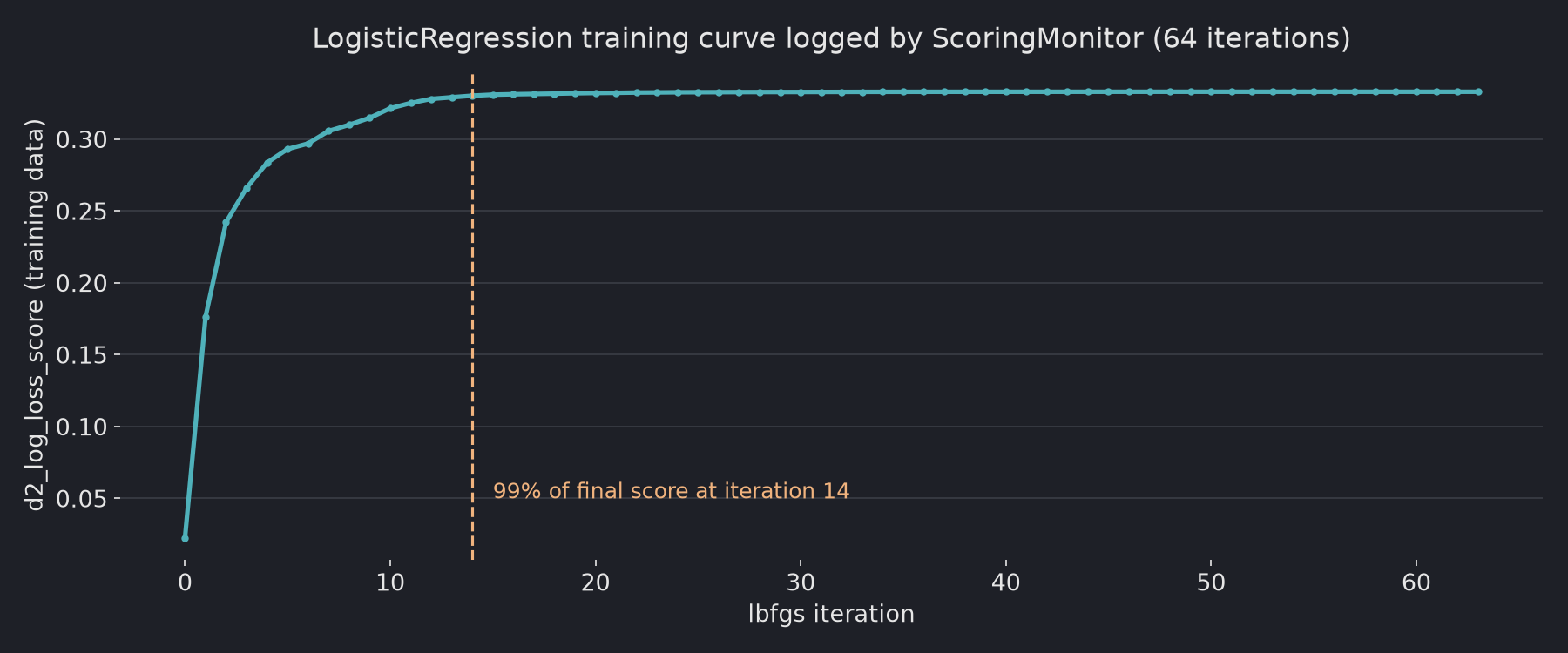
The score reaches 99% of its final value at iteration 14 of 64. That is useful for tuning max_iter or tol. Keep in mind this is the score on the training data, so it tells you about convergence, not about generalization.
Should you use callbacks now?
| Use it for | Avoid relying on it for |
|---|---|
Watching long GridSearchCV / RandomizedSearchCV runs | Production code that must not break on upgrade |
Checking lbfgs convergence in LogisticRegression | Tree models, SVMs, and other estimators without set_callbacks |
Seeing which Pipeline step is slow | Validation scores (ScoringMonitor here scores the training data) |
Sources
- Release Highlights for scikit-learn 1.9 — checked 2026-09-28
- Callbacks user guide — list of supported estimators, checked 2026-09-28
sklearn.callback.ProgressBar— notes therichrequirementsklearn.callback.ScoringMonitor- scikit-learn 1.9.1 on PyPI — released 2026-09-10
Related: Min-max scaling vs standardization: when should you use which?