BFS, DFS, Dijkstra and A* on the same grid: what each one actually guarantees
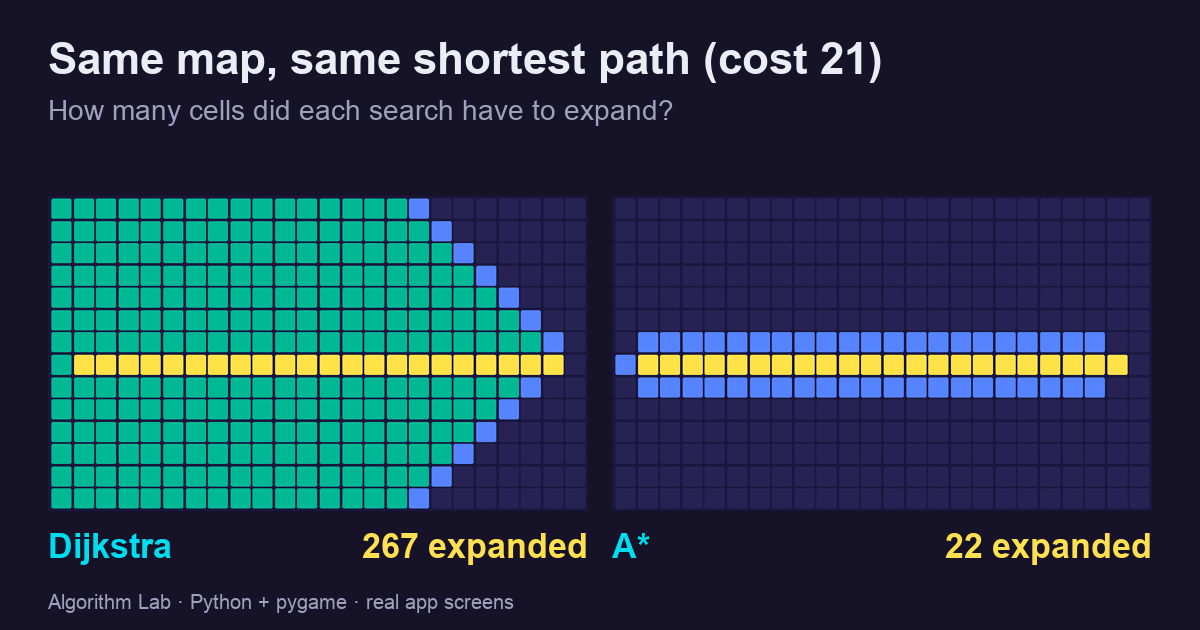
Four grid searches run in a small pygame app on fixed maps. DFS found a 25-step path where BFS found 13, BFS walked through a swamp that Dijkstra avoided, and A* reached the same optimal cost as Dijkstra after expanding 22 cells instead of 267.
All four algorithms “find a path”. They do not promise the same path. On four fixed maps in a small pygame app, measured with the app’s own search code:
| Map | Algorithm | Path cost | Steps | Cells expanded |
|---|---|---|---|---|
| Wall in the middle | BFS | 13 | 13 | 102 |
| DFS | 25 | 25 | 25 | |
| Swamp in the middle | BFS | 29 | 13 | 111 |
| Dijkstra | 17 | 17 | 150 | |
| Open map | Dijkstra | 21 | 21 | 267 |
| A* | 21 | 21 | 22 | |
| One expensive cell | A* | 15 | 15 | 42 |
| A* with h × 3 | 17 | 13 | 14 |
In one line each: DFS only promises a path. BFS promises the fewest steps. Dijkstra promises the lowest cost. A* promises the lowest cost too, with far less work, as long as its guess never overestimates.
The app is open source: github.com/zayunsna/Algorithm-visualizer.
Tested on 2026-10-14 with Python 3.12.13 and pygame 2.6.1 (official wheel) on macOS, in a fresh clone.
One loop, four algorithms
A grid search keeps a frontier: cells it has reached but not yet expanded. Each round it takes one cell out, looks at its neighbours, and adds the new ones. The only real difference between the four algorithms is which cell comes out next.
| Algorithm | Frontier | Takes out next |
|---|---|---|
| BFS | queue (first in, first out) | the oldest cell |
| DFS | stack (last in, first out) | the newest cell |
| Dijkstra | priority queue | the cell with the lowest cost so far, g |
| A* | priority queue | the cell with the lowest g + h, where h guesses the remaining cost |
In the app this is a single generator in algoviz/pathfinding.py. These lines are copied from it:
def key(p, g):
    return g + (heuristic_weight*h(p) if algorithm == "A*" else 0)
if weighted:
    _, entry_id, p, g = heapq.heappop(heap)
    if dist.get(p) != g or p in settled:
        yield Event("stale", "Discard stale priority-queue entry", {("frontier",entry_id):DELETE})
        continue
else:
    p,entry_id = queue.popleft() if algorithm == "BFS" else queue.pop()
popleft() makes the deque a queue (BFS), pop() makes it a stack (DFS). Dijkstra and A* share one heap and differ only in key. Each heap entry carries a serial number, so two cells with the same key come out in insertion order. That is the tie-breaking trick from the Python heapq documentation (checked 2026-10-14), and it is why every run here is exactly reproducible.
Like the sorting visualizer, the search never touches pygame. It yields an event at every step, and the window only draws what the events say. That is also what makes the Back button possible: the app records the events and can undo them one by one.
Costs work like this: entering a normal cell costs 1, entering a swamp cell costs 5, and the start cell is free. Neighbours are always checked in the order up, right, down, left.
BFS vs DFS: the fewest steps, or just a path
The first map has a wall across the middle. Start is on the left, goal on the right, and the direct route is open.
BFS grows in rings around the start. It reaches every cell 1 step away, then every cell 2 steps away, and so on, so the first time it touches the goal, no shorter route exists. It found the 13-step path, after expanding 102 cells.
DFS checks “up” first and keeps going in that direction. It climbs over the wall, runs along the top, and comes back down: 25 steps. It expanded only 25 cells, because it never went back to try anything else.
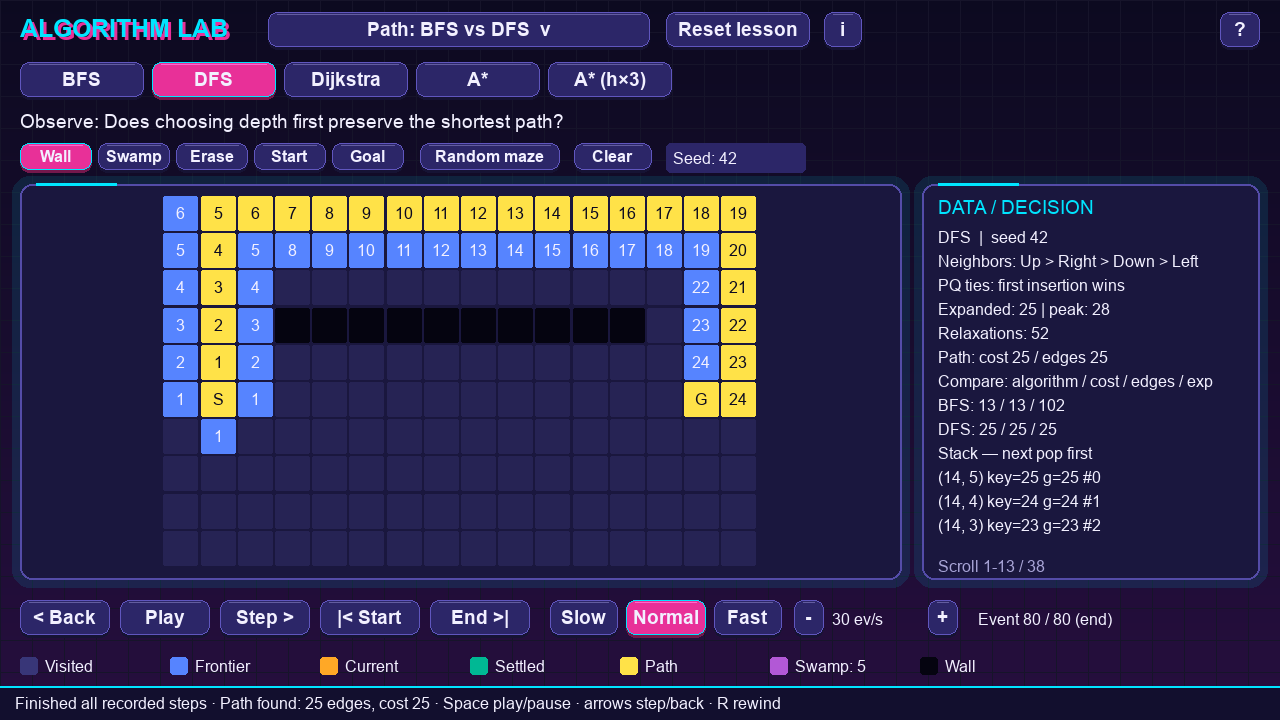
So DFS is not “a slower BFS”. It is fine when you only need to know whether a path exists, or to visit everything reachable. It is the wrong tool when you need the shortest path, and which path it returns depends on the order in which it checks neighbours.
BFS vs Dijkstra: fewest steps is not lowest cost
The second map puts a swamp (cost 5 per cell) on the straight line between start and goal.
BFS does not look at costs at all. It still returns 13 steps, straight through the swamp: total cost 29. Dijkstra always expands the cheapest cell on the frontier, so it finds the detour around the swamp: 17 steps, cost 17.
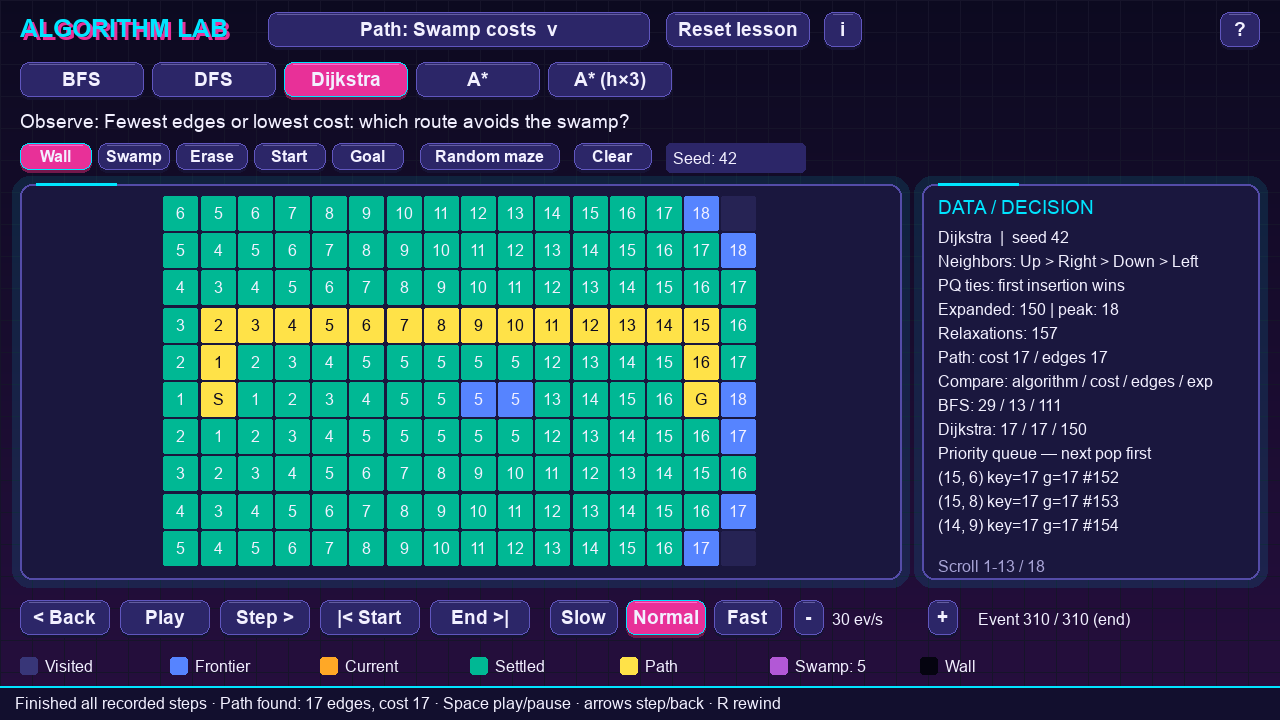
The numbers in the cells are g, the cheapest known cost to reach that cell. Dijkstra paid for its answer: it expanded 150 cells against BFS’s 111. On a map where every step costs the same, BFS and Dijkstra give the same cost, and BFS is the simpler tool.
One detail in the code: Dijkstra stops when the goal comes out of the priority queue, not when it is first seen. A cell can be reached first by an expensive route and later by a cheaper one; only when it is taken out of the queue is its cost final. BFS can stop as soon as it sees the goal, because in BFS the first route found is also the shortest.
Dijkstra vs A*: same answer, a tenth of the work
The third map is open, 24 × 14 cells, with start and goal on the same row. Dijkstra has no idea where the goal is. It grows in every direction, like BFS but ordered by cost:
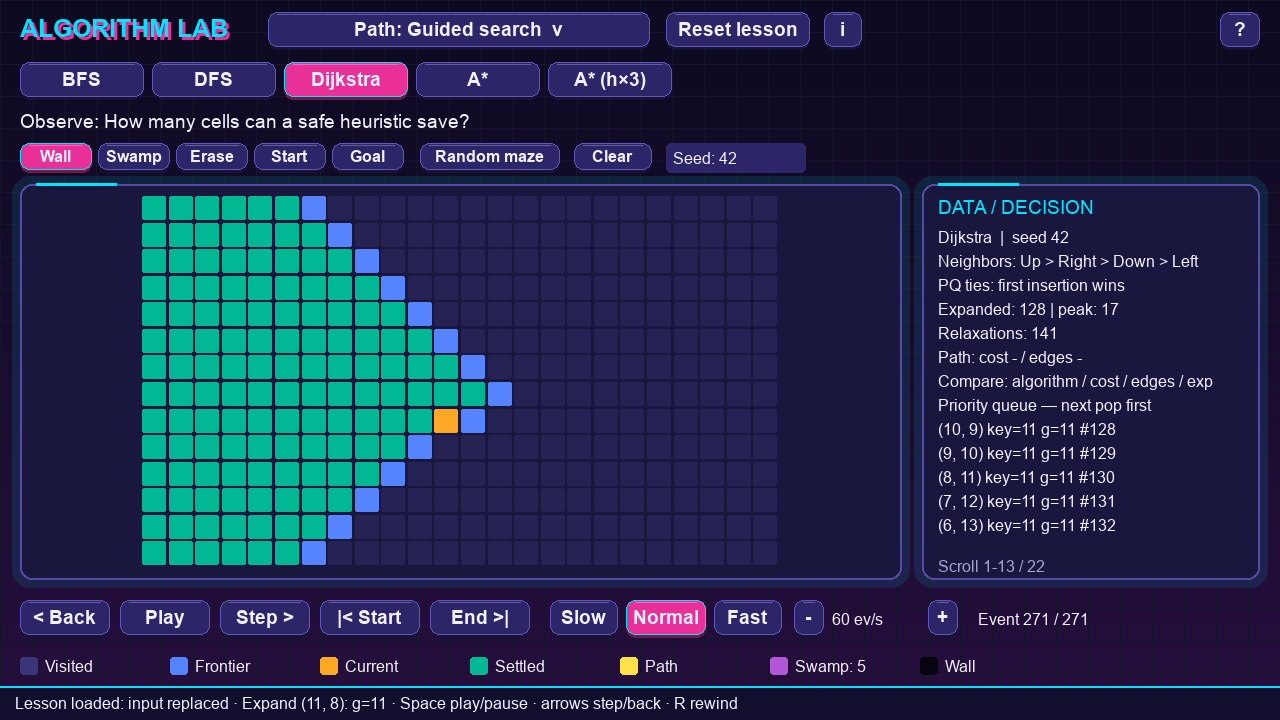
A* adds h, the Manhattan distance to the goal (horizontal plus vertical distance). Cells toward the goal now have a smaller g + h, so they come out first.
Both runs play at the same speed, three events per video frame. Dijkstra expanded 267 cells, A* expanded 22. Both found a path of cost 21.
A* keeps Dijkstra’s guarantee because of one property of h: it never overestimates. On this grid every step costs at least 1, and you need at least the Manhattan distance in steps to reach the goal. So the real remaining cost is never less than h. A guess with that property is called admissible.
A* with an inflated guess: faster, and wrong
What if you multiply the guess by 3? The fourth map has a single cell that costs 5, right on the straight line.
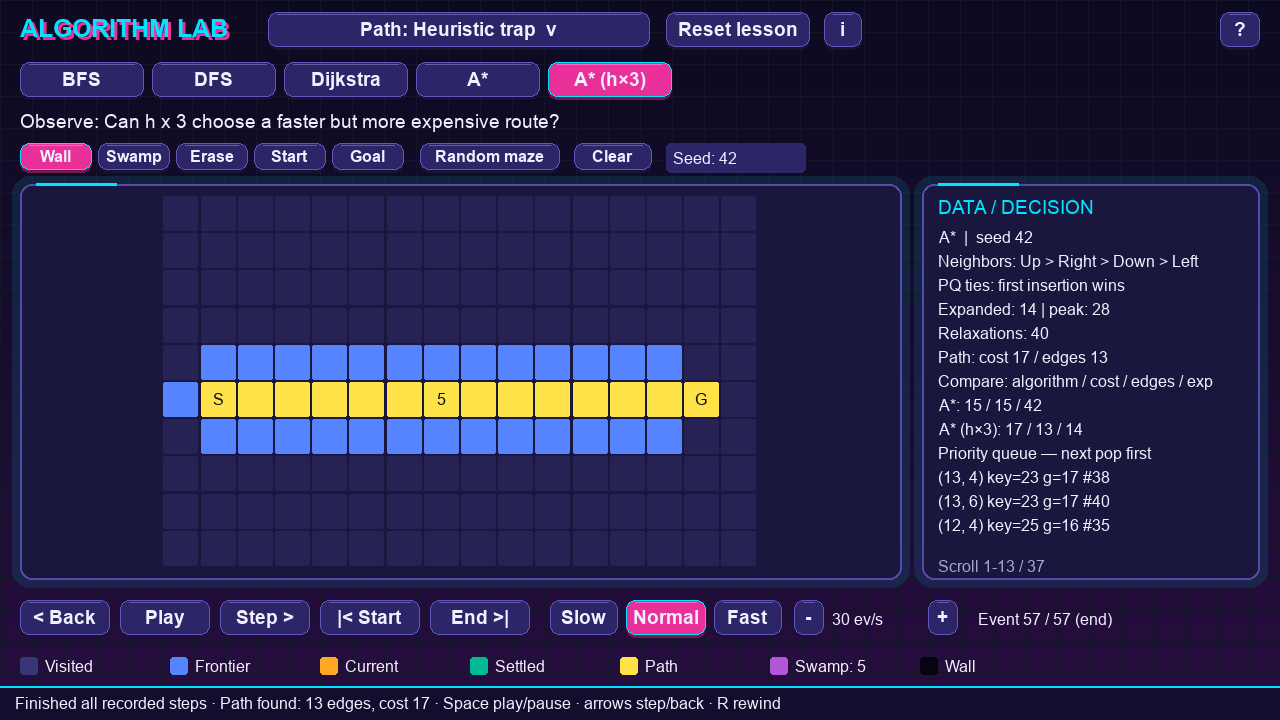
Normal A* walks around the expensive cell: 15 steps, cost 15, 42 cells expanded. With h × 3 the goal looks so attractive that A* goes straight through it: 13 steps, cost 17, only 14 cells expanded.
That is the trade. An inflated h can overestimate, so the optimality guarantee is gone. Sometimes “close enough, much faster” is what you want, for example in a game where a slightly longer route goes unnoticed. It should be a decision, not an accident from a badly scaled heuristic.
Reproduce the table
This script uses the app’s own search generator, with no window. Save it as compare_maps.py in the repository folder and run it with .venv/bin/python compare_maps.py:
"""Run every lesson map through the app's own search generator and print the comparison."""
from algoviz.lessons import LESSONS, path_input
from algoviz.pathfinding import search

PLANS = [("BFS", 1), ("DFS", 1)], [("BFS", 1), ("Dijkstra", 1)], \
        [("Dijkstra", 1), ("A*", 1)], [("A*", 1), ("A*", 3)]

print(f"{'map':22} {'algorithm':10} {'cost':>4} {'edges':>5} {'expanded':>8} {'events':>6}")
for i, plan in enumerate(PLANS):
    for algorithm, weight in plan:
        state, events = {}, 0
        for ev in search(path_input(i), algorithm, weight):
            events += 1
            state.update({k[0]: v for k, v in ev.changes.items() if len(k) == 1})
        label = algorithm if weight == 1 else f"{algorithm} h*{weight}"
        print(f"{LESSONS[i].title[6:]:22} {label:10} {state['cost']:>4} {state['length']:>5} "
              f"{state['expanded']:>8} {events:>6}")
Output:
map                    algorithm  cost edges expanded events
BFS vs DFS             BFS          13    13      102    215
BFS vs DFS             DFS          25    25       25     80
Swamp costs            BFS          29    13      111    234
Swamp costs            Dijkstra     17    17      150    310
Guided search          Dijkstra     21    21      267    549
Guided search          A*           21    21       22     89
Heuristic trap         A*           15    15       42    119
Heuristic trap         A* h*3       17    13       14     57
“Expanded” counts cells taken out of the frontier and processed. It is a fair way to compare the work the algorithms do here; it is not a timing benchmark.
Run the app
git clone https://github.com/zayunsna/Algorithm-visualizer.git
cd Algorithm-visualizer
python3.12 -m venv .venv
.venv/bin/python -m pip install --only-binary=:all: -r requirements.txt
./run.sh
The first screen is the BFS vs DFS map. Click BFS, then DFS, and the panel on the right adds a row for each. Space plays and pauses, → and ← step forward and back one event, and End >| jumps to the result. You can draw your own walls and swamps with the Wall and Swamp buttons, or generate a random maze from a seed. During A*, hovering over a cell shows its g, h and f.
In the fresh clone, the project’s own test suite passed (55 tests). The path tests compare the search costs with an independent Bellman-Ford computation on 400 small random grids. The screenshots and videos above were rendered headless; the app was not tried on other operating systems or HiDPI screens.
Path search is 4 of the app’s 20 lessons. The others cover memoized Fibonacci, LCS and 0/1 knapsack tables, cases where a greedy choice fails, and bit operations, each with a fixed input, a question, and a step-by-step replay.
Which one to use
| You need | Use |
|---|---|
| Any path, or to visit every reachable cell | DFS (or BFS) |
| The fewest steps, every step costs the same | BFS |
| The lowest total cost, costs differ | Dijkstra |
| The lowest total cost, and an estimate of the remaining distance that never overestimates | A* |
| A good-enough path fast, accepting a longer one | A* with an inflated heuristic, on purpose |
Related: Do you need a vector database? Exact search vs HNSW on 134,000 real embeddings · Sorting algorithms, visualized in Python · Loop vs vectorization: how much faster is NumPy, really?