Loop vs vectorization: how much faster is NumPy, really?
Measured on 1 million numbers: a real NumPy expression was 40× faster than a Python loop, np.vectorize was 2.4× slower, and converting a list to an array erased most of the gain. Tested with NumPy 2.5.
TL;DR — On 1 million numbers, a NumPy expression (np.where) ran 40× faster than a Python for loop. But np.vectorize was 2.4× slower than the loop, and if your data starts as a Python list, converting it to an array every time wipes out most of the speedup. Vectorize by keeping data in arrays and using NumPy operations, not by wrapping a loop.
Tested on 2026-09-28 with NumPy 2.5.3 and Python 3.12.13 on an Apple M5. Times are the best of 5 runs.
Key points
- Vectorization means expressing an operation on a whole array (
x * x), so the loop runs in compiled C instead of Python. - List comprehensions are not vectorization. They were about as fast as a plain
forloop here. np.vectorizeis not vectorization either. NumPy’s own docs say it is “essentially a for loop”.- Convert once, not per call. Turning a list into an array costs about as much as looping over it.
- Tiny arrays don’t benefit. At 10 elements, the loop and NumPy took about the same time.
How much faster is a NumPy expression than a loop?
The task: square every positive number and set the rest to 0, for 1 million values. Four ways, same result:
import timeit
import numpy as np

rng = np.random.default_rng(0)
x = rng.normal(size=1_000_000)
xs = x.tolist()

def py_loop():
    out = []
    for v in xs:
        out.append(v * v if v > 0 else 0.0)
    return out

def list_comp():
    return [v * v if v > 0 else 0.0 for v in xs]

vec_func = np.vectorize(lambda v: v * v if v > 0 else 0.0)

def np_vectorize():
    return vec_func(x)

def numpy_where():
    return np.where(x > 0, x * x, 0.0)

assert np.allclose(py_loop(), numpy_where()) and np.allclose(np_vectorize(), numpy_where())

results = {}
for name, fn in [("Python for loop", py_loop), ("list comprehension", list_comp),
                 ("np.vectorize", np_vectorize), ("NumPy (np.where)", numpy_where)]:
    best = min(timeit.repeat(fn, number=1, repeat=5)) * 1000
    results[name] = best
base = results["Python for loop"]
for name, ms in results.items():
    print(f"{name:<20} {ms:8.1f} ms   {base / ms:6.1f}x vs loop")
Python for loop          21.3 ms      1.0x vs loop
list comprehension       20.5 ms      1.0x vs loop
np.vectorize             50.5 ms      0.4x vs loop
NumPy (np.where)          0.5 ms     39.9x vs loop
| Approach | Time | vs. loop | Runs in |
|---|---|---|---|
for loop | 21.3 ms | 1.0× | Python |
| List comprehension | 20.5 ms | 1.0× | Python |
np.vectorize | 50.5 ms | 0.4× (slower) | Python, called once per element |
np.where(x > 0, x * x, 0.0) | 0.5 ms | 39.9× | Compiled NumPy code |
np.vectorize calls your Python function once per element and adds its own overhead on top. It’s useful for making a scalar function accept arrays, not for speed.
Does NumPy help when the data starts as a list?
Barely, if you convert on every call. Here is a sum of squares at different sizes, in three setups:
import timeit
import numpy as np

def per_call_us(fn, number):
    return min(timeit.repeat(fn, number=number, repeat=5)) / number * 1e6

print(f"{'n':>9} | {'loop (us)':>10} | {'NumPy (us)':>10} | {'list->array + NumPy (us)':>24}")
for n in [10, 100, 1_000, 10_000, 100_000, 1_000_000]:
    xs = np.random.default_rng(0).normal(size=n).tolist()
    arr = np.array(xs)
    number = max(1, 200_000 // n)
    t_loop = per_call_us(lambda: sum(v * v for v in xs), number)
    t_np = per_call_us(lambda: float(np.dot(arr, arr)), number)
    t_conv = per_call_us(lambda: float(np.dot(a := np.array(xs), a)), number)
    print(f"{n:>9} | {t_loop:>10.2f} | {t_np:>10.2f} | {t_conv:>24.2f}")
        n |  loop (us) | NumPy (us) | list->array + NumPy (us)
       10 |       0.23 |       0.21 |                     0.41
      100 |       1.61 |       0.22 |                     1.46
     1000 |      15.31 |       1.08 |                    15.37
    10000 |     150.09 |       1.23 |                   122.71
   100000 |    1489.60 |       3.00 |                  1102.83
  1000000 |   15246.96 |      86.67 |                 11540.54
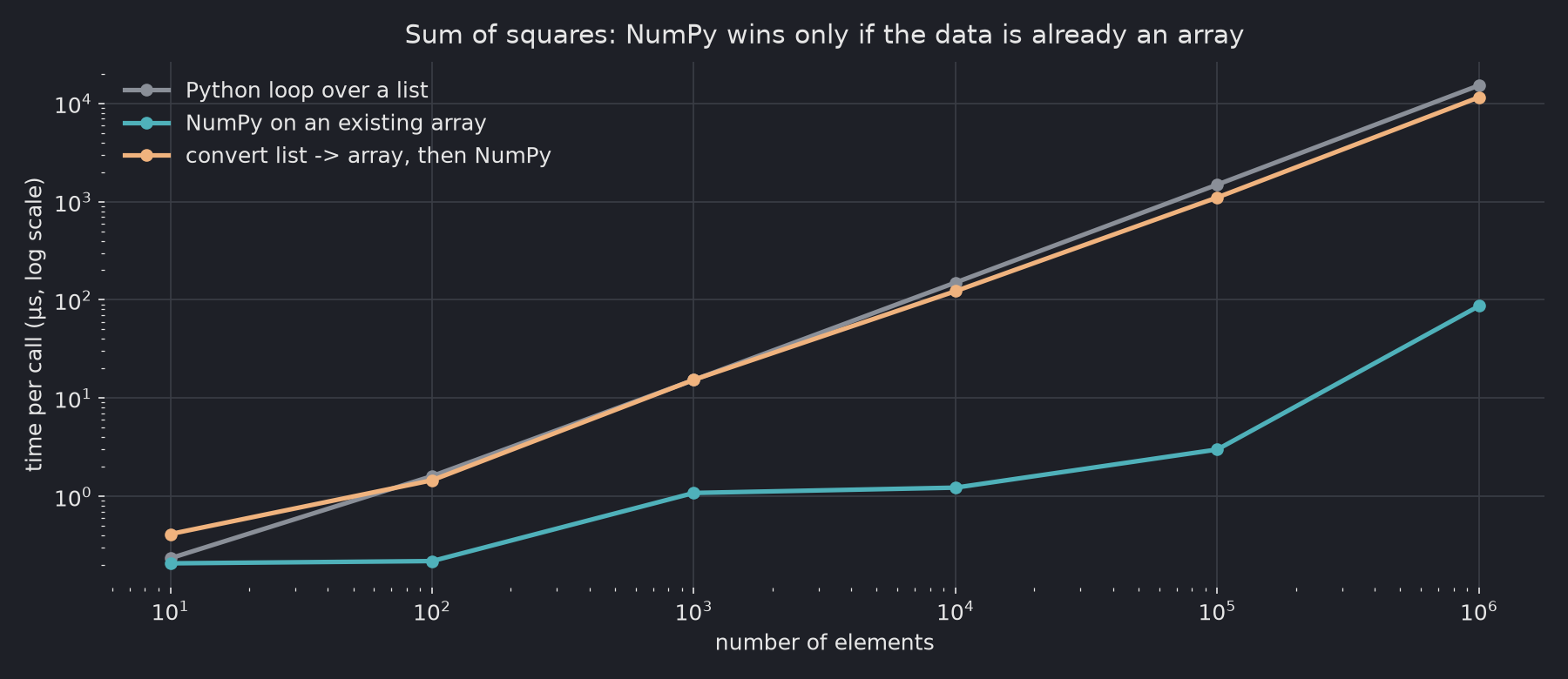
At 1 million elements, NumPy on an existing array took 0.087 ms, versus 15.2 ms for the loop. With a list-to-array conversion on each call, it took 11.5 ms, only 1.3× faster than the loop. Almost all the time goes into np.array(xs), which has to read every Python float one by one.
At 10 elements, all three are under half a microsecond, and the conversion makes NumPy the slowest.
How do you vectorize real code?
| Loop pattern | Vectorized version |
|---|---|
if v > 0: ... else: ... per element | np.where(x > 0, a, b) |
| Several conditions | np.select([cond1, cond2], [a, b], default=c) |
| Running total | np.cumsum(x) |
| Count or sum matching values | (x > 0).sum(), x[x > 0].sum() |
| Loop over rows of a DataFrame | Column arithmetic: df["a"] * df["b"] |
Keep data as NumPy arrays (or pandas columns) from the moment you load it, and convert results back to Python objects only at the end.
Sources
numpy.vectorize— “provided primarily for convenience, not for performance”, NumPy docs, checked 2026-09-28
Related: Python의 속도를 빠르게 만드는 방법 — five speed tips tested (in Korean) · pandas vs Polars vs DuckDB in 2026