Your first LSTM forecast in PyTorch: from CSV to predictions
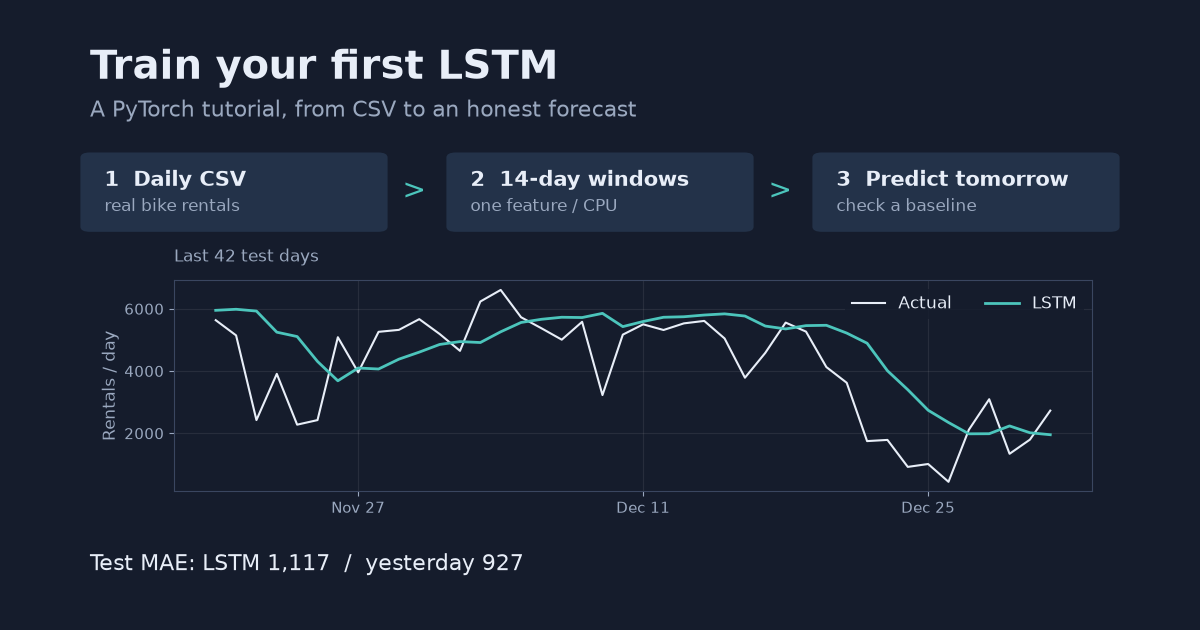
A step-by-step LSTM tutorial using real daily bike rentals: load and plot a CSV, build 3D input windows, train on CPU, and compare next-day predictions with yesterday’s value. Complete runnable Python code included.
By the end of this tutorial, you will have a small LSTM that takes 14 days of bike rentals and predicts the next day, plus plots and an error score you can check against a simple rule. No GPU, account or API key is needed. Basic Python, arrays and the idea of a training set are enough to follow along.
Here is the result before the code: on the final 110 days, the LSTM missed by 1,117 rentals per day on average. Predicting yesterday’s value missed by 927. The network trained successfully; it was not the better forecaster. That distinction is part of the exercise, not a reason to throw away the run.
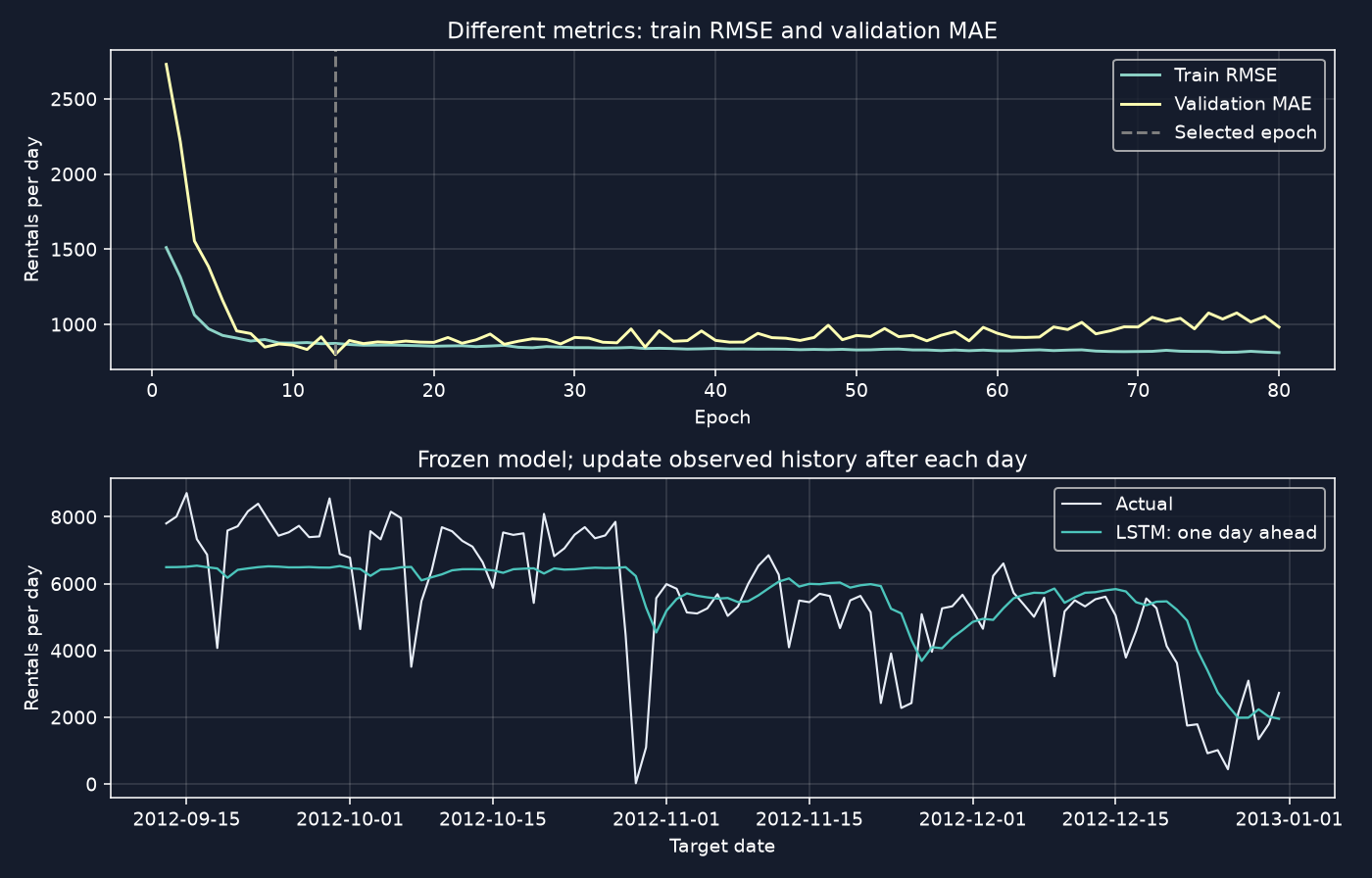
We will build the input windows, train the model, and reproduce that comparison. This is rolling one-day-ahead prediction: after each day finishes, its actual count becomes available for tomorrow’s input. It is not a forecast of all 110 days made at once, and the model weights stay fixed throughout the test period.
1. Prepare a small CPU environment
Tested on 2026-10-28 with Python 3.12.13, PyTorch 2.14.0, NumPy 2.5.4, pandas 3.0.6, scikit-learn 1.9.1 and Matplotlib 3.11.0 on macOS, Apple M5. Training the 80 epochs took about 0.9 seconds on one CPU thread. A cold end-to-end run, including imports, download and plots, took 27 seconds and peaked at about 459 MiB resident memory; package installation is not included. These are measurements on this machine, not runtime guarantees.
Download lstm_tutorial.py and requirements.txt into an empty working folder. With Python 3.12 installed, the macOS/Linux terminal commands are:
python3.12 -m venv .venv
source .venv/bin/activate
python -m pip install -r requirements.txt
python lstm_tutorial.py
The script downloads the data on its first run and writes its CSVs and PNGs under results/. No notebook is required. The instructions below are the same computation split into steps: run every Python block in order in one process, or put them in one file. The downloaded script adds version logging and the final combined plot.
import copy
import io
import time
import urllib.request
import zipfile
from pathlib import Path

import matplotlib
matplotlib.use("Agg")
import matplotlib.pyplot as plt
import numpy as np
import pandas as pd
import torch
from sklearn.preprocessing import StandardScaler
from torch import nn
from torch.utils.data import DataLoader, TensorDataset

WINDOW, EPOCHS = 14, 80
OUT = Path("results")
OUT.mkdir(parents=True, exist_ok=True)
torch.manual_seed(0)
np.random.seed(0)
torch.set_num_threads(1)
torch.use_deterministic_algorithms(True)
plt.style.use("dark_background")
plt.rcParams.update({"figure.figsize": (10, 3.8), "axes.grid": True,
                     "figure.facecolor": "#151c2c", "axes.facecolor": "#151c2c",
                     "grid.alpha": 0.15})
Agg saves plots without a desktop display. Open the PNG files to inspect them. CPU execution and fixed seeds make this run easier to reproduce, but PyTorch does not promise identical results across platforms and releases.
2. Download and inspect the daily CSV
Use the UCI Bike Sharing dataset, credited to Hadi Fanaee-T (2013), DOI 10.24432/C5W894, under CC BY 4.0. The archive contains both hourly and daily data. We use day.csv: 731 consecutive dates from 2011–2012.
The target, cnt, is the total number of daily rentals. Use only past counts as inputs. Do not add the same day’s casual and registered columns: their sum is the answer. Weather and calendar features can wait until the basic pipeline works.
URL = "https://archive.ics.uci.edu/static/public/275/bike+sharing+dataset.zip"
archive = OUT / "bike_sharing.zip"
if not archive.exists():
    request = urllib.request.Request(URL, headers={"User-Agent": "LSTM-Tutorial/1.0"})
    with urllib.request.urlopen(request, timeout=60) as response:
        archive.write_bytes(response.read())
with zipfile.ZipFile(io.BytesIO(archive.read_bytes())) as zipped:
    df = pd.read_csv(zipped.open("day.csv"), parse_dates=["dteday"])
df = df.sort_values("dteday").set_index("dteday")
assert df.index.is_unique and df.index.is_monotonic_increasing
assert df.index.to_series().diff().iloc[1:].eq(pd.Timedelta(days=1)).all()
assert df["cnt"].notna().all() and df["cnt"].ge(0).all()
values = df[["cnt"]].to_numpy(dtype=np.float32)
train_end, val_end = int(len(df) * 0.70), int(len(df) * 0.85)
print(f"Rows: {len(df)}; {df.index[0].date()} to {df.index[-1].date()}")
print(f"Rows before windowing: train={train_end}, "
      f"validation={val_end - train_end}, test={len(df) - val_end}")
Rows: 731; 2011-01-01 to 2012-12-31
Rows before windowing: train=511, validation=110, test=110
The assertions matter: 14 rows mean 14 days only if dates are consecutive. If a check fails on another dataset, investigate the missing or duplicate dates instead of silently filling future values into the past.
3. Look at the timeline before training
fig, ax = plt.subplots()
ax.plot(df.index, values[:, 0], lw=0.8, color="#8cb8ff")
ax.axvline(df.index[train_end], color="#d18a26", label="Validation starts")
ax.axvline(df.index[val_end], color="#b54966", label="Test starts")
ax.set(xlabel="Date", ylabel="Rentals per day", title="Daily bike rentals: keep the future at the end")
ax.legend()
fig.tight_layout()
fig.savefig(OUT / "timeline.png", dpi=140)
plt.close(fig)
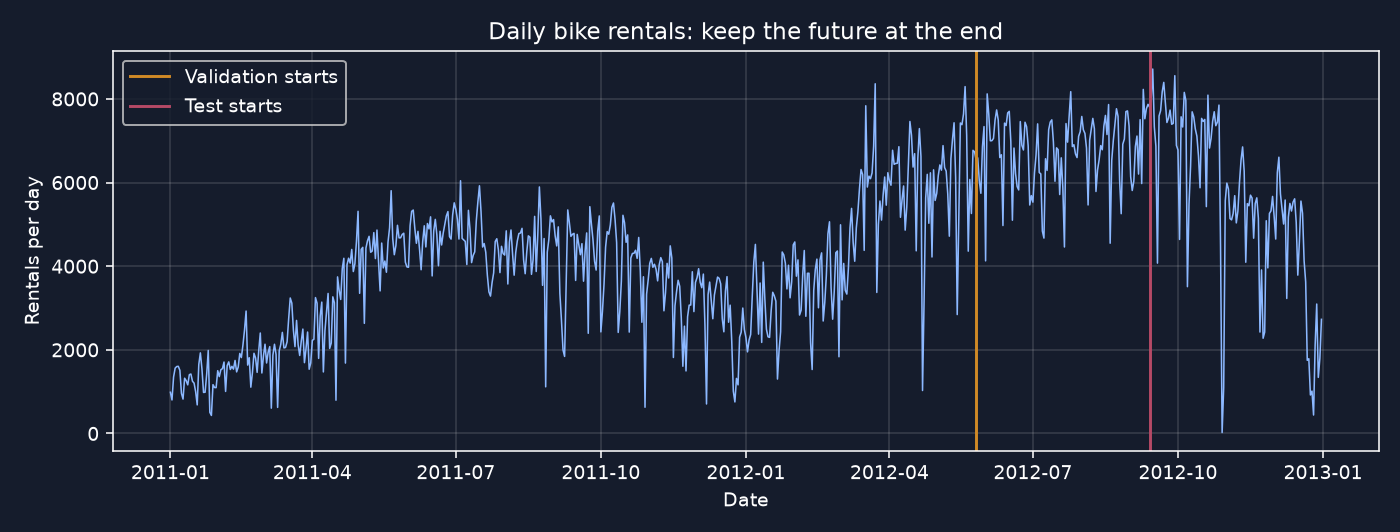
Demand changes across seasons and between the two years. A shuffled split would mix those periods together; instead, the earliest 70% is training, the next 15% is validation, and the remainder is test. Validation chooses the checkpoint. Test measures that choice on later dates; it does not choose the model or epoch.
4. Turn the series into input windows
Fit the scaler on training rows only, then apply that same transformation everywhere. We scale the target series as well, so predictions must later be converted back to rentals per day.
Build each input from rows t-14 through t-1, with row t as its target. Assign windows to splits by their target date, not by randomly splitting the finished windows.
scaler = StandardScaler().fit(values[:train_end])
scaled = scaler.transform(values).astype(np.float32)
target_idx = np.arange(WINDOW, len(values))
X = np.stack([scaled[t - WINDOW:t] for t in target_idx])
y = scaled[target_idx]
assert X.shape == (len(df) - WINDOW, WINDOW, 1)
assert np.array_equal(X[0, :, 0], scaled[:WINDOW, 0])
assert y[0, 0] == scaled[WINDOW, 0]
masks = [target_idx < train_end,
         (target_idx >= train_end) & (target_idx < val_end),
         target_idx >= val_end]
(X_train, y_train), (X_val, y_val), (X_test, y_test) = [
    (torch.from_numpy(X[m]), torch.from_numpy(y[m])) for m in masks
]
print("Train:", tuple(X_train.shape), tuple(y_train.shape))
print("Validation:", tuple(X_val.shape), tuple(y_val.shape))
print("Test:", tuple(X_test.shape), tuple(y_test.shape))
print(f"First window: {df.index[0].date()} to {df.index[WINDOW - 1].date()} "
      f"-> target {df.index[WINDOW].date()}")
Train: (497, 14, 1) (497, 1)
Validation: (110, 14, 1) (110, 1)
Test: (110, 14, 1) (110, 1)
First window: 2011-01-01 to 2011-01-14 -> target 2011-01-15
The training set loses its first 14 dates because they have no complete history. The first validation window can use the final 14 training days, and the first test window can use the final 14 validation days: these values are already known at their forecast origins. Later test windows use earlier observed test counts, never the target day itself. That is why this is a daily-updated one-step evaluation.
Each input has shape (samples, 14, 1): samples, timesteps, features. For the dimension rules and the batch_first pitfall, see LSTM input shape explained.
5. Define the smallest useful training model
class DailyLSTM(nn.Module):
    def __init__(self):
        super().__init__()
        self.lstm = nn.LSTM(input_size=1, hidden_size=16, batch_first=True)
        self.head = nn.Linear(16, 1)

    def forward(self, x):
        sequence, _ = self.lstm(x)
        return self.head(sequence[:, -1, :])

model = DailyLSTM()  # CPU; no hidden state is carried between windows.
loader = DataLoader(TensorDataset(X_train, y_train), batch_size=32, shuffle=True)
optimizer = torch.optim.Adam(model.parameters(), lr=0.003)
loss_fn = nn.MSELoss()
print("Parameters:", sum(p.numel() for p in model.parameters()))
Parameters: 1233
The LSTM produces 16 hidden values at each timestep. Take the final timestep, then use a linear layer to produce one standardized count. It is a single-layer, unidirectional network, not a pretrained model.
shuffle=True reorders training windows, not the train/validation/test split. It is appropriate here because every window starts with a fresh hidden state. Carrying state between batches would need a different loader and training design; it is outside this tutorial.
6. Train and keep the checkpoint that validation selects
Training minimizes mean squared error (MSE) on standardized counts. After each epoch, measure validation mean absolute error (MAE), without gradients, and keep the best weights. Copy the state: retaining only a reference to the live parameters would not preserve an earlier checkpoint.
history = []
best_val, best_epoch, best_state = float("inf"), 0, None
started = time.perf_counter()
for epoch in range(1, EPOCHS + 1):
    model.train()
    total = 0.0
    for xb, yb in loader:
        optimizer.zero_grad()
        prediction = model(xb)
        loss = loss_fn(prediction, yb)
        loss.backward()
        optimizer.step()
        total += loss.item() * len(xb)
    model.eval()
    with torch.no_grad():
        val_mae = (model(X_val) - y_val).abs().mean().item()
    history.append([epoch, total / len(X_train), val_mae])
    if val_mae < best_val:
        best_val, best_epoch = val_mae, epoch
        best_state = copy.deepcopy(model.state_dict())
training_seconds = time.perf_counter() - started
model.load_state_dict(best_state)
model.eval()
history = pd.DataFrame(history, columns=["epoch", "train_mse_scaled", "val_mae_scaled"])
history.to_csv(OUT / "history.csv", index=False)
print(f"Best epoch: {best_epoch}; validation MAE: {best_val * scaler.scale_[0]:.1f} rentals/day")
print(f"Training only: {training_seconds:.2f} s (CPU, one thread)")
Best epoch: 13; validation MAE: 798.9 rentals/day
Training only: 0.92 s (CPU, one thread)
Your timing will differ. The run completed all 80 epochs but restored epoch 13, rather than keeping the last weights. The opening plot shows training RMSE and validation MAE in original units; they are different metrics, so the vertical gap between those two curves is not a like-for-like generalization-gap estimate. The validation curve and selected checkpoint are the useful checks here.
7. Predict in real units and compare with doing almost nothing
with torch.no_grad():
    predicted = scaler.inverse_transform(model(X_test).numpy()).ravel()
idx = target_idx[masks[2]]
actual = values[idx, 0]
predictions = {"Yesterday": values[idx - 1, 0],
               "Last week": values[idx - 7, 0], "LSTM": predicted}
scores = {}
for name, forecast in predictions.items():
    scores[name] = float(np.mean(np.abs(actual - forecast)))
    print(f"{name:10s} test MAE: {scores[name]:.1f} rentals/day")
result = pd.DataFrame({"date": df.index[idx], "actual": actual, **predictions})
result.to_csv(OUT / "predictions.csv", index=False)
pd.Series(scores, name="test_mae_rentals_per_day").to_csv(OUT / "scores.csv")
print(f"Test targets: {df.index[idx[0]].date()} to {df.index[idx[-1]].date()}")
Yesterday  test MAE: 926.6 rentals/day
Last week  test MAE: 1382.1 rentals/day
LSTM       test MAE: 1117.2 rentals/day
Test targets: 2012-09-13 to 2012-12-31
MAE is the average absolute miss: smaller is better. All three methods predict the same dates from information available before each target day. The LSTM is better than repeating last week’s value here, but worse than repeating yesterday’s. A declining training loss does not establish useful forecasting skill.
For a closer look at any errors, predictions.csv contains the actual values and all three forecasts. The full script saves the combined training-and-prediction figure shown at the top. The other output, reference_output.txt, records the seed-0 run.
What to change next
Try a 7-day window instead of 14. Check the first target date and training sample count before looking at model scores. Then compare validation MAE, not repeated test scores, when choosing between the two. Treat the test period above as spent once you start using its results to make decisions; reserve a new later period for a fresh estimate. The 7-day exercise is a suggestion, not a measured improvement.
Keep expectations modest: there are only 497 training windows in this run, the inputs omit weather and calendar features, and the test period covers only part of one year. This is a teaching example, not a claim that LSTM is the right model for bike demand. Seeds 1 and 2, using the same prechosen architecture, split and validation rule, gave test MAEs of 1,060.2 and 1,046.5. Neither beat yesterday. Seed 0 remains the worked example; no seed was chosen for having the lowest test error.
If you want to forecast a whole week without receiving daily observations, this evaluation no longer answers your question. Continue with recursive vs direct multi-step forecasting. For the split and leakage issues, see KFold vs TimeSeriesSplit.
Implementation references, checked 2026-10-28: PyTorch LSTM input/output and initial states, StandardScaler and training-set statistics, and PyTorch reproducibility limits.